Add-ons
Raise one limit or turn on one feature without changing the whole plan: extra staff, orders, landing pages, storage or your own domain. Buying, quantity, duration and one more month.

On this page
Say your plan suits you, except you need one more staff member. Instead of a bigger plan, buy an add-on. Add-ons are bought for one store, on that store’s Plan & limits page, by the owner or anyone the owner gave the billing permission (the store’s billing).
The add-ons
| Add-on | What it adds | Runs for |
|---|---|---|
| 1 extra staff member | Staff members +1 | Monthly |
| 1,000 more orders a month | Orders per month (cancelled possibly fake orders don’t count) +1,000 | Monthly |
| 5 more landing pages | Landing pages +5 | Monthly |
| 5 GB more storage | Storage +5 GB | Monthly |
| Custom domain | Your own domain on | Monthly |
The list and prices can change; the panel always shows the current ones, each marked “/ month” or “one-time”.
Buy an add-on
- In the store, open Plan & limits from the left menu.
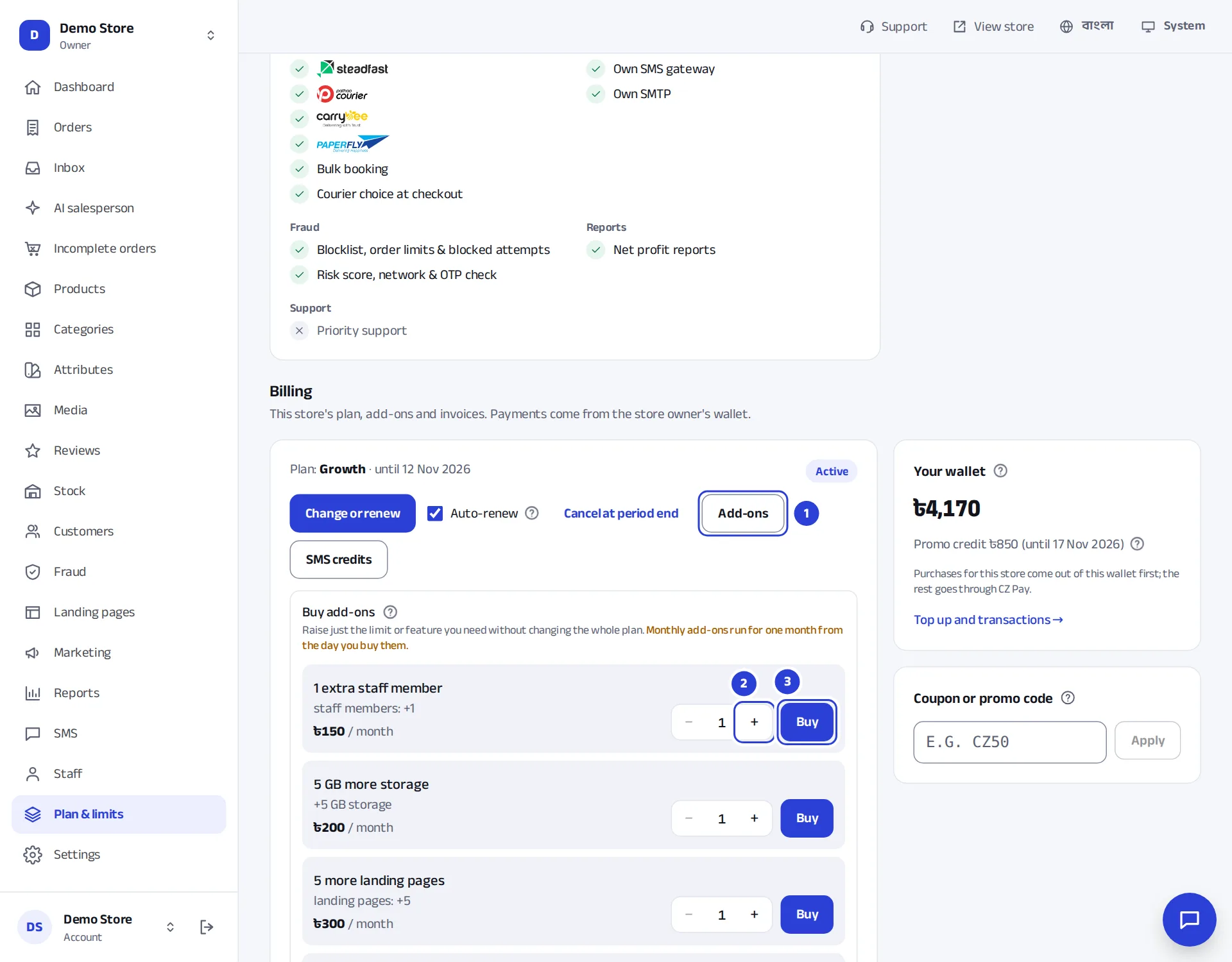
- In the billing section at the bottom, press Add-ons 1. The Buy add-ons panel opens.
- For the limit you want to raise, set the quantity with − and + 2 (1 to 100). For example 3 adds 3 staff members and costs 3 times as much; the button shows the total.
- Press Buy 3.
- The payment summary shows what the wallet pays and what is left for CZ Pay; press Pay now.
“Done”, with the add-on and its end date, means the extra limit or feature is on right away.
Tip
On Plan & limits, when a limit reaches 80%, whoever handles billing gets a Buy add-ons link right on that limit’s card. It opens the add-ons panel directly.
Duration and one more month
- A monthly add-on runs for one month from the day you buy it. It does not renew by itself; buy it again before it ends if you still need it.
- Buying a limit add-on again adds another one, each with its own month.
- While an on/off add-on such as Custom domain is running, its button says One more month. The new month starts when the current one ends, so no days are lost.
- When it ends, the extra limit or feature goes away within the hour and the store is back to its plan’s limits (what lies beyond them becomes inactive: after a smaller plan).
- An add-on that gives free SMS or AI credits each month gives them once for each month you buy, in the month it starts.
- A month bought ahead (with One more month) starts only when the current one ends: if the current month is refunded, the add-on stops then, it does not run on the next month early.
Add-ons that don’t show
If the store’s plan already has something (the feature is on, or the limit is unlimited), its add-on isn’t offered, because it would add nothing. For example, the Growth plan already includes your own domain. A line below says: “… add-ons are not shown: this plan already has them or has no limit there.” When there’s nothing to buy: “There is nothing to add to this store’s plan right now.”
An on/off add-on such as Custom domain that the store already has for good (given by us with no end date, or bought once) isn’t offered either. One with an end date still is; buying it again adds time.
See active add-ons
The store’s Plan & limits page lists them in its Add-ons card, for all staff to see: the name, the quantity, and the end date (No end date when there is none).
See also: Plan & limits, Choosing and changing plans, Billing and wallet.