Automatic recovery SMS
Shoppers who leave checkout get up to 3 SMS on their own, each with a link to finish the order. Never at night, and it stops when they order or ask for no more.

On this page
With automatic recovery on, a shopper who gave their phone and left gets an SMS by itself: “Your order is not complete yet. Finish it in one tap”. The link opens their bag and form filled in, so all they do is press order.
Good to know
Sending on its own is part of Growth and Pro. On other plans the page says “This feature is not in your plan.”, but you can still send one by hand from an incomplete order. Compare plans: Plans.
Turn it on
- Open Settings and press Automatic recovery SMS (or Auto-recovery settings at the top of Incomplete orders).
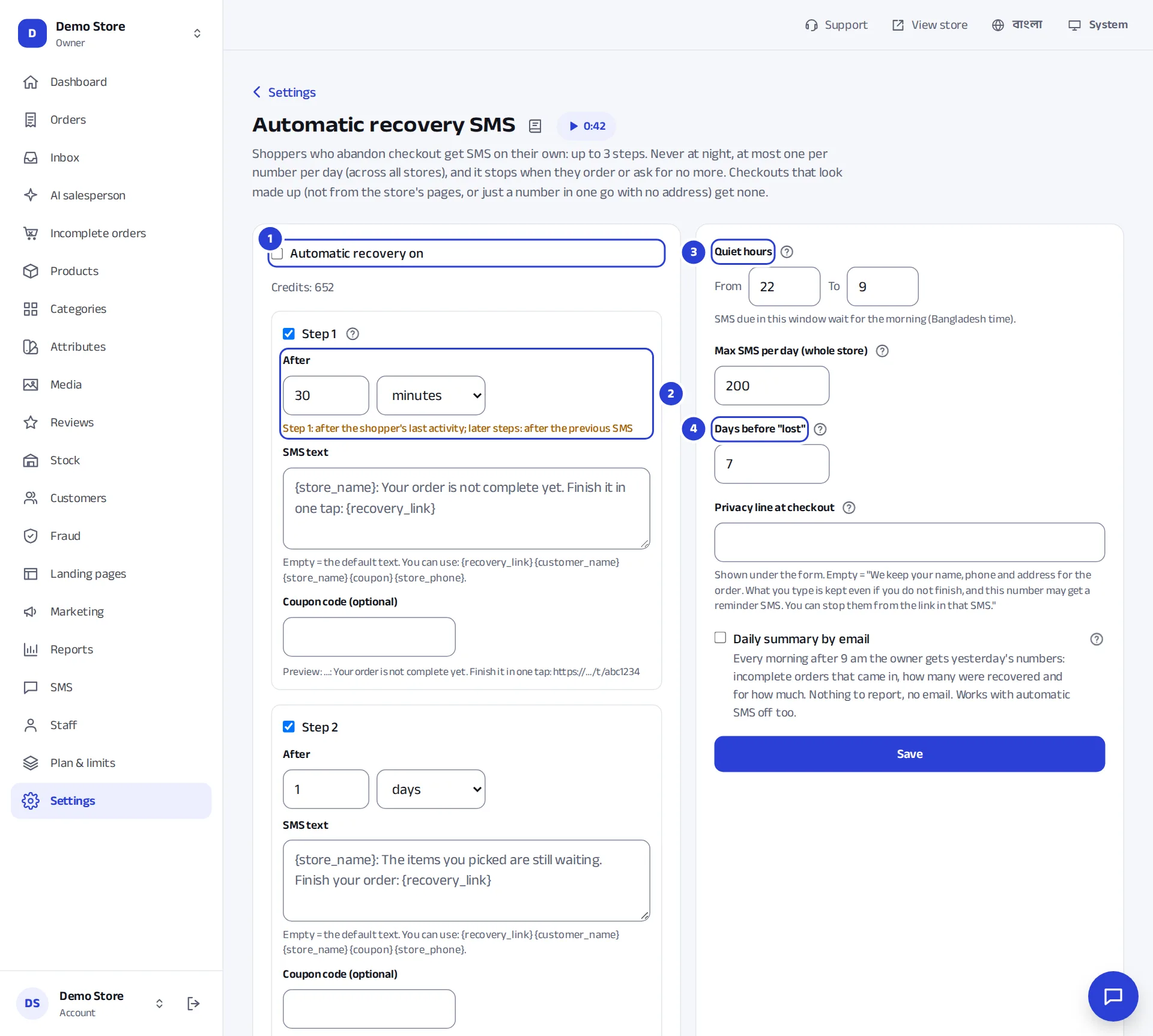
- Tick Automatic recovery on 1.
- Check the steps (below), then press Save. You’ll see “Saved”.
Under the tick you see your SMS credits right now and how many numbers asked for no more SMS.
The page is for anyone with permission to follow up incomplete orders (owners, admins, managers and order staff have it), with or without permission to change settings, and only they see the links to it. Someone who can only see incomplete orders doesn’t get them.
Steps: which SMS and when
Up to 3 steps. Each one has 2:
- The tick beside the step’s name (Step 1, 2, 3): untick to skip that step.
- After: a number and a unit (minutes, hours, days). Step 1 counts from the shopper’s last activity, later steps from the previous SMS. At least 5 minutes.
- SMS text: empty sends our text. Your own text can be up to 480 characters.
- Coupon code (optional): put
{coupon}in the text and this code goes in the SMS. Make the coupon first under Coupons; the shopper types the code at checkout.
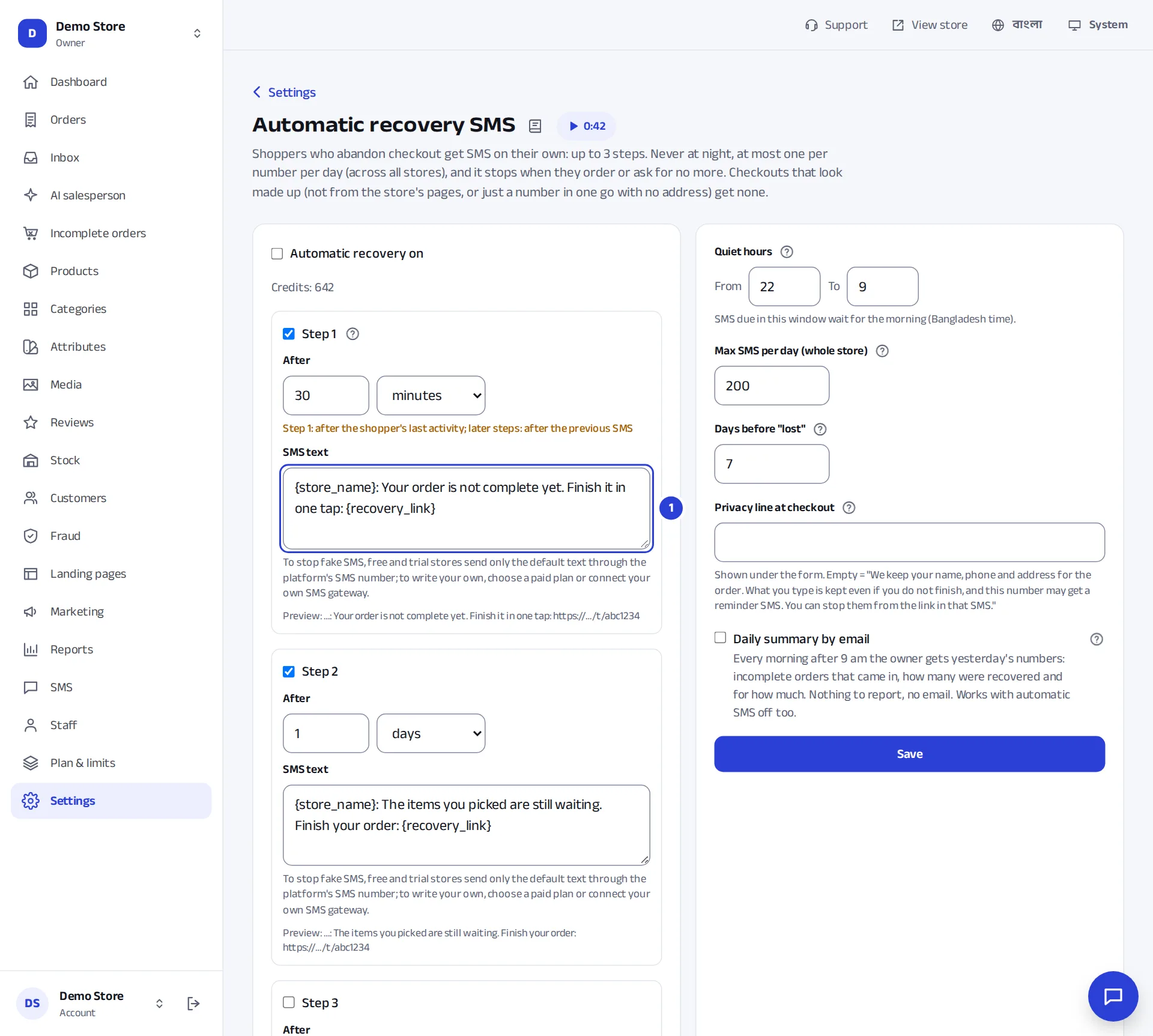
On the free plan or in a trial, through the platform’s SMS number, each step sends our text: the text box shows it read-only 1 and the coupon box is hidden. A text saved earlier is kept for when you choose a paid plan or connect your own SMS gateway (why).
Out of the box:
| Step | After | State |
|---|---|---|
| 1 | 30 minutes | on |
| 2 | 1 day | on |
| 3 | 3 days | off |
You can use {recovery_link} (the link to finish the order), {customer_name}, {store_name}, {coupon} and {store_phone} (your store’s contact number, only when it is the verified mobile of the owner or a staff member; otherwise it stays empty). A text can’t carry a link or web address you type yourself: such a text won’t save, so the link goes in through {recovery_link}. The Preview under each step shows how the SMS will read.
Tip
Keep
{recovery_link}in the text: without it the shopper can’t come back in one tap. Bangla fits 70 characters in a part, so with the link it is usually 2 parts (how credits count).
Quiet hours
Under Quiet hours 3 set From and To (hours 0–23, Bangladesh time). It starts at 22 to 9. An SMS due in that window waits until it ends. The same number in both boxes means no quiet hours.
Daily limits
- One number gets at most one recovery SMS in 24 hours, counting every store on CZ Commerce. If someone types a person’s number into many shops, that person still gets one SMS a day. Your SMS then waits a day.
- Max SMS per day (whole store): how many recovery SMS the whole store sends in 24 hours. It starts at 200. Past the limit, the rest wait.
- The platform also has its own daily number of automatic recovery SMS for each store, which grows with your confirmed orders (how many SMS a day). Past it the timeline says Today’s reminder SMS limit reached.
- While the store is paused for its account’s plan, it takes no orders, so the steps wait.
Days before “lost”
Days before “lost” 4 (1–60, starting at 7). Once every step that is on has gone out (or the SMS were stopped) and the shopper does nothing more for this many days, the order becomes Lost by itself. This only happens while automatic recovery is on. You can Reopen it from its page.
What stops the SMS
No more SMS go to an incomplete order when:
- the shopper places the order (from the link or on their own);
- they press No more SMS about this on the recovery link page, or reply just
STOPorবন্ধ(when sent through our gateway); - you press No more SMS or Junk, or save Not interested / Wrong number as the call outcome;
- the number, the shopper’s device or their IP address is blocked in your store (even if you blocked it after they left);
- the attempt looks fake (below);
- every step that is on has been sent.
When it stops, the timeline on its page says “Auto SMS stopped” and why.
Attempts that look fake
Anyone can type a number into a checkout and leave. A prankster or a bot could type numbers of people who never visited your store, and you would pay for SMS to them. So the automatic SMS only goes when the attempt looks like a real shopper on your store’s pages:
- it came from your store’s checkout or landing page. Those pages always send a device ID. An attempt without one gets none: “Not from the store’s pages (no device id)”;
- the shopper filled in the address, or took some time on the form (the number came at least 10 seconds after the checkout opened). A number typed in one go, with no address, gets none: “No sign of a shopper: a number in one go, no address”;
- one device or one IP address did not leave many different numbers (3 from one device within a day, or 5 from one IP within an hour, are too many): “Many numbers from one device or address”;
- something was in the bag, or picked on the landing page: with nothing to bring back there is no SMS: “Nothing was picked”.
These attempts stay in the list, so you can still call them. Recovery SMS now on the order’s page still works if you decide to send one yourself.
Credits
Each recovery SMS uses SMS credits. With no credits, a red warning shows on the page, the SMS waits and is tried again 6 hours later. With your own SMS gateway no credits are used.
The recovery link
The link works for 7 days and can be opened again and again. It shows the shopper’s bag and their name, phone and address, and Go to checkout takes them to the order form. Products switched off or out of stock since then are left out, and the shopper is told. An order from the link makes the incomplete order Recovered.
Privacy line at checkout
Privacy line at checkout shows under the checkout form and the landing pages’ order forms, so shoppers know their details are kept. Empty shows: “We keep your name, phone and address for the order. What you type is kept even if you do not finish, and this number may get a reminder SMS. You can stop them from the link in that SMS.” Up to 300 characters.
Daily summary by email
Tick Daily summary by email and every morning after 9 am the owner gets yesterday’s numbers: incomplete orders that came in, how many were recovered and for how much. A day with nothing to report sends nothing. It works with automatic SMS off too.
SMS not going out? See When SMS are not sent.