Customer's courier record: success ratio
See on every order how many parcels the customer took and sent back at your couriers, turn it on per courier, find the merchant-panel login it needs, look up any number, and let checkout act on a poor record.

On this page
Before you send a cash-on-delivery parcel, it helps to know whether this customer usually takes their parcels. Your couriers know: they keep every customer’s delivered and returned parcels. With the courier record on, each order shows that history, asked with your own courier accounts.
Turn it on
- Open Settings › Couriers, the Customers’ success ratio tab.
- In Customers’ success ratio, switch on the switch 1 beside each courier you want (Show customers’ success ratio). It saves as soon as you press it.
- Where a courier needs or takes its merchant-panel login (below), press its Panel email (Panel phone number for Carrybee), type the login 2 and the password, and press Save 3. We try it at once and tell you if the courier took it.
- Test tries the saved login again at any time.
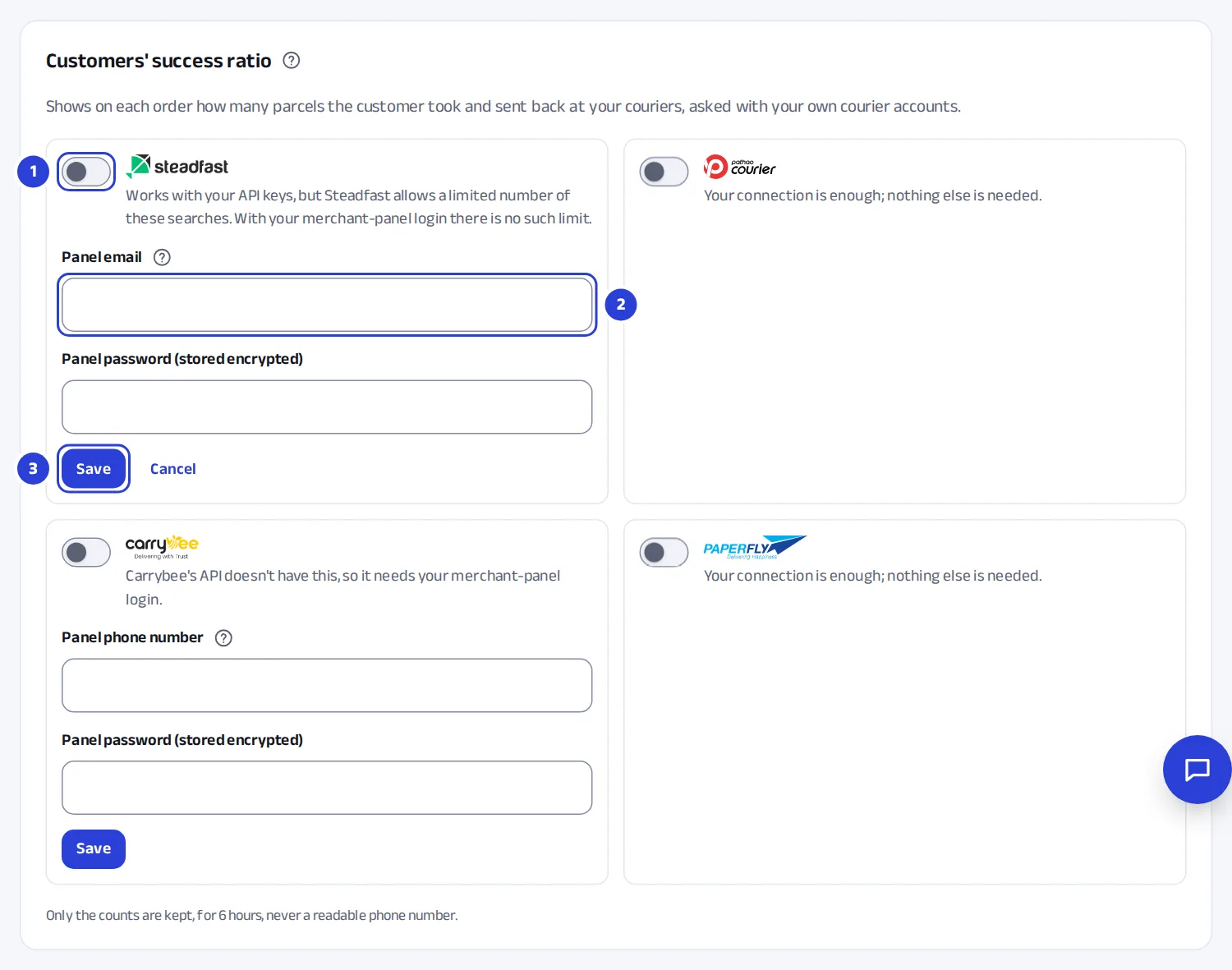
Only couriers you connected and switched on are asked, and only they appear on your orders.
Which login each courier needs
- Pathao and Paperfly: nothing more. The connection you already made is enough.
- Steadfast: works with your API keys, but Steadfast allows only a limited number of these searches. Give your merchant-panel login (the email and password you use on steadfast.com.bd) and there is no such limit. When the searches run out, the order says Steadfast’s search allowance is used up until the next day.
- Carrybee: its API doesn’t have this, so it needs your merchant-panel login: the phone number and password you use on merchant.carrybee.com.
Use your own verified account. A courier refusing the login shows Login failed: check Settings on the order; we don’t try that login again until you save it again.
What the numbers mean
The Courier record card on an order, on an incomplete checkout and beside a chat in the Inbox (the customer panel) has one row per courier. In the inbox it shows once the customer gives a number in the chat or you link them to a store customer.
- Delivered: parcels this customer received.
- Cancelled / returned: parcels refused, returned or cancelled at the door.
- Total and success: success = delivered ÷ (delivered + cancelled/returned). Parcels still on the way are left out.
- At the top, all couriers together, coloured: 80% or more green, 50 to 79% amber, below 50% red.
Some couriers don’t split their figures exactly that way, so the row says approximate:
- Pathao gives the total and the delivered ones; the rest is counted as cancelled/returned. For most shops Pathao shows only a rating (Excellent, Good, Risky …) and no counts: the row shows only the rating and “Pathao gives a rating, no counts”. In the total, the rating counts as an estimated rate: Excellent ≈95%, Good ≈85%, Moderate ≈65%, Risky ≈40%, Flagged ≈20%, Fraud ≈5%; a new customer adds nothing. It weighs as much as an average courier (at least 3 parcels’ worth), and the total says “estimated with Pathao’s rating”. The checkout rule’s “at least N parcels” counts only counted parcels.
- Carrybee gives the total and the cancelled ones; its delivered figure also holds parcels still on the way. Its figures are your own business’s history with that customer at Carrybee, so they are kept for your shop only, never shared with other shops.
- Paperfly counts a partly delivered parcel as delivered.
A row may say why there is no answer: the courier not answering, limiting requests, or a login to fix in Settings. Check again asks the couriers again (a few times per order, to protect your courier account). The order list shows the total as a small badge.
Look up a number
To see a number’s record before there is an order (one taken by phone or message), open the Check a number tab under Fraud.
- Type the number in Mobile number: 01712345678, +8801712345678 or in Bangla digits, any way works.
- Press Look up. The same record as on an order appears below: the success ratio of all couriers together, a row per courier, “approximate” notes and why a courier did not answer.
- Answers from the last 6 hours come first; otherwise your couriers are asked, which can take a few seconds.
- Together with Check again on orders, your store can look up 30 times in 10 minutes. When that is used up the tab says so; try again a few minutes later.
- If no courier shows the record, the tab says so, with a link to turn it on in Settings › Couriers.
- The tab needs permission to change orders. The number you type is never kept in a readable form.
The checkout rule
On the Fraud page’s Settings tab, the Checkout by courier record card can act on a poor record. It is off until you turn it on.
- Switch on Act on a poor record 4.
- Set At least this many parcels 5 and Success below (%) 6 (1 to 100).
- Pick the action under Then 7, then press the card’s Save.
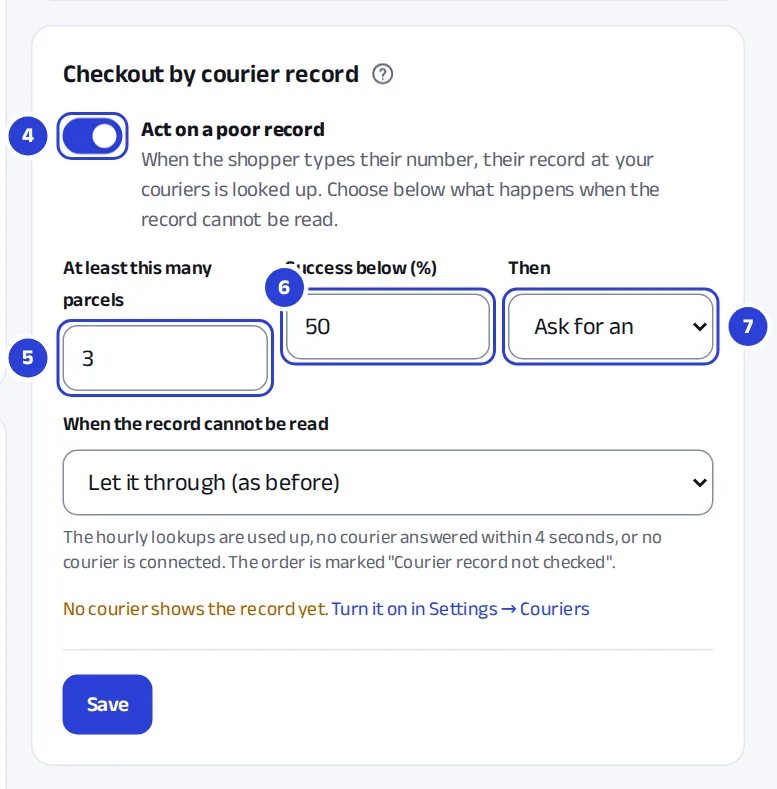
With it on:
- When the shopper types their phone number, the record is looked up in the background, so it is usually ready when they press order.
- If the customer has at least the set number of parcels (default 3) and a success ratio below the set percent (default 50%), the order gets your chosen action: ask for an SMS code (default), hold it, accept prepaid only, or refuse it. Prepaid only and refusing need the parcels the couriers counted themselves: when the minimum is reached only with a figure a courier works out (Pathao’s cancelled, Carrybee’s delivered, which can hold parcels still on the way), the order is held for you to check instead.
- If the record can’t be read (no courier answered within 4 seconds, your lookups for the hour are used up, or no courier is connected), the order says Courier record not checked and gets what you chose under When the record cannot be read: Let it through (as before) (the default), Ask for the SMS code or Put the order on hold. See Fraud: when the courier record can’t be read.
- Shoppers from one network (one IPv4 address or IPv6 /64) get 5 of these checkout lookups an hour at each courier account, 15 for a whole /48; past that they share a small extra allowance, then their orders say Courier record not checked. Shoppers signed in to the store aren’t limited this way. So one person can’t use up your courier account’s lookups.
Asking for an SMS code is offered only on plans with fraud checks (in both choices); on other plans it is not among the choices and the default is to hold the order.
Privacy and limits
- A courier’s answer is kept for 6 hours and reused for every shop (Carrybee’s only for your shop: it is your own history there), so the same customer is not asked about again and again. We keep only the counts, with the phone number in a form that can’t be read back, and never which shop asked.
- Your shop keeps its own last record for each customer for 90 days, for your orders.
- To protect your courier account (couriers block automated traffic), each account makes at most 60 lookups an hour and 500 a day, and a courier that limits us is left alone for a while.