Where orders come from
How many orders, deliveries and sales each source, campaign or landing page brought. Tag your links with UTM to tell your ads apart.

On this page
This report shows which ad or post actually sells. The link a shopper first arrives by is kept with their order, and orders are grouped by it.
Open the report
- Open Marketing in the left menu and go to Where orders come from. You need permission to view reports.
- Set the start and end dates 1. It starts at the last 30 days. Orders count on the day they came in (Bangladesh time).
- Pick Group by 2: Source (utm_source), Campaign (utm_campaign) or Landing page.
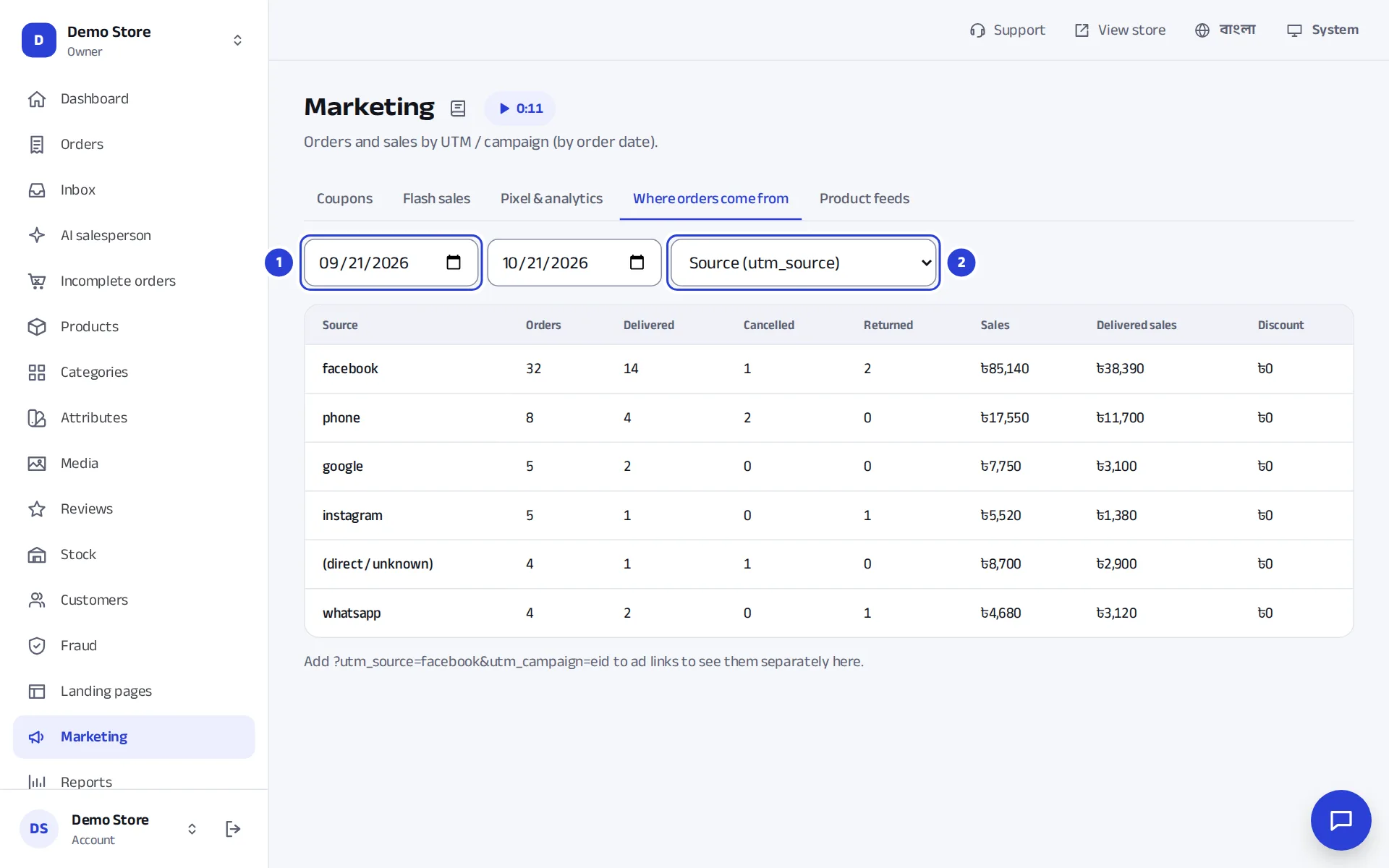
How orders are grouped
Source (utm_source): the link’s utm_source. Without one:
- a Facebook
fbclidin the link givesfacebook, a Googlegclidgivesgoogle; - arriving from another website gives
referral; - an order you took by hand uses the channel you picked:
facebook,phone,whatsapp,instagram,walk_inorother, and a channel of your own by its name, such as “Daraz” (manual orders); - a shopper who came through a product card in your web chat gives
web_chat; an order the AI salesperson took in Messenger or Instagram givesmessengerorinstagram; - nothing known gives (direct / unknown).
Campaign (utm_campaign): the link’s utm_campaign, otherwise (direct / unknown).
Landing page: which landing page the order came from, by page name. Store orders show their source or (direct / unknown).
Up to 100 rows, busiest first. Orders waiting because the month’s order limit is used up aren’t counted until they show in your orders.
Good to know
(direct / unknown) means the shopper typed the address, used a bookmark or a link without tags. Some apps don’t say where a visit came from, so some orders always land here.
The columns
| Column | Meaning |
|---|---|
| Source | the name, by the grouping above |
| Orders | every order, cancelled included |
| Delivered | delivered (partly delivered included) |
| Cancelled/returned | orders cancelled or returned |
| Sales | product price after discounts (no delivery charge) of orders that weren’t cancelled or returned |
| Delivered sales | the same, of delivered orders only, the closest to real income |
| Discount | discounts given on orders that weren’t cancelled or returned (coupons, combos and so on) |
A source with many Orders and many Cancelled/returned may be bringing fake or half-interested buyers; check that ad.
Tag your links
Add UTM tags to the end of an ad or post link and each shows up separately:
https://your-store.{root}/p/punjabi?utm_source=facebook&utm_campaign=eidutm_source: where you put the link, likefacebook,instagram,youtube,sms.utm_campaign: which offer or ad, likeeidorwinter-sale.utm_medium,utm_contentandutm_termare kept too, but the report groups by source and campaign.
If the link already has a ?, start the first tag with &. Use lowercase and no spaces, or Facebook and facebook become two rows. You can add a coupon to the same link: &coupon=EID20 (Coupons).
If the shopper later arrives by another link in the same tab, the first link still counts.
See also: Pixel and Conversions API · Landing pages in Facebook ads · Reports