Setting up the Pathao webhook
Put our address and token on Pathao's Webhook Integration page, save Pathao's Integration Secret with us, then press Save at Pathao. In that order, Pathao accepts the address the first time.

On this page
With the webhook, Pathao sends every pickup, delivery and return the moment it happens, and the order moves by itself. Pathao has one extra step: it gives you an Integration Secret that we must keep. Without it, Pathao cannot verify the address.
Good to know
Connect Pathao first (Connecting a courier). The webhook address and token only appear once it is connected.
Copy the address and the token
- Open Settings › Couriers.
- On the Couriers tab, press Open beside Pathao. On its card, find Webhook: automatic order status.
- Tap Copy next to Webhook address (Callback URL) 1.
- Tap Copy under Token / Secret 2.
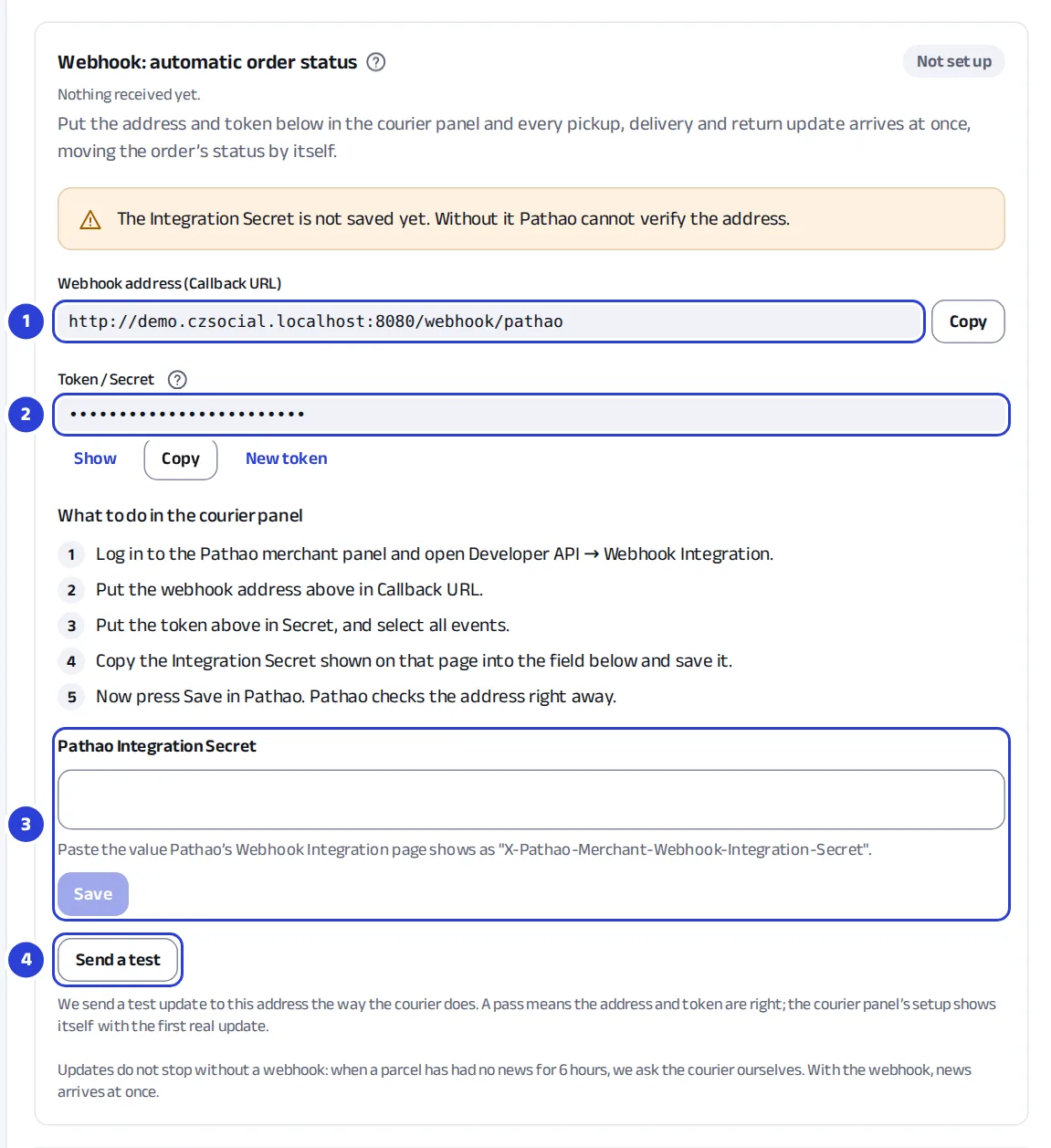
The address looks like https://your-store.{root}/webhook/pathao.
Paste them in the Pathao panel
- Log in to the Pathao merchant panel and open Developer API → Webhook Integration.
- Paste the address in Callback URL.
- Paste the token in Secret.
- Select all events.
- Don’t press Save yet.
Bring the Integration Secret to us
- That Pathao page shows a value named X-Pathao-Merchant-Webhook-Integration-Secret. Copy it.
- In your dashboard, paste it in Pathao Integration Secret 3.
- Press Save. Saved appears next to it.
Until it is saved, the card shows a yellow message: “The Integration Secret is not saved yet…”.
Now press Save at Pathao
Back on the Pathao page, press Save. Pathao immediately sends the address a check, and we answer with your Integration Secret. That is why the secret has to be saved first; otherwise Pathao rejects the address.
Check that it works
In your dashboard, press Send a test 4. We send a test update the way Pathao does.
- “The address works and the token matches.” means our side is right.
- With the first real update the card says Working, and every update is listed under Recent updates (press it to open the list).
- Token mismatch means the token in Pathao’s Secret field is wrong: copy it in again.
Tip
We can’t ask Pathao about a booking by our own reference: when a booking gets no clear answer, Pathao’s webhook is what settles it by itself. Set the webhook up before you start booking.
If you make a new token
New token stops the old token at once. Paste the new one in Pathao’s Secret field and save there again. If Pathao shows a new Integration Secret, paste that in our field too.
More: What a webhook is and why · When the webhook doesn’t work