Coupons
A code at checkout gives a discount: a percentage, a fixed amount or free delivery. Minimum order, total and per-customer limits, dates and a share link.

On this page
A coupon is a code like EID20; the shopper types it at checkout and gets a discount. The discount is worked out on our server, so the limits hold even when many orders come in at once.
Good to know
Making and changing coupons is on Starter, Growth and Pro. On Free the page says “This feature is not in your plan. Upgrade to turn it on.” (Plans)
The page needs the Marketing: coupons, flash sales, landing pages permission: the owner, admins and managers have it (staff roles).
New coupon
- Open Marketing in the left menu. The first tab is Coupons.
- Press New coupon.
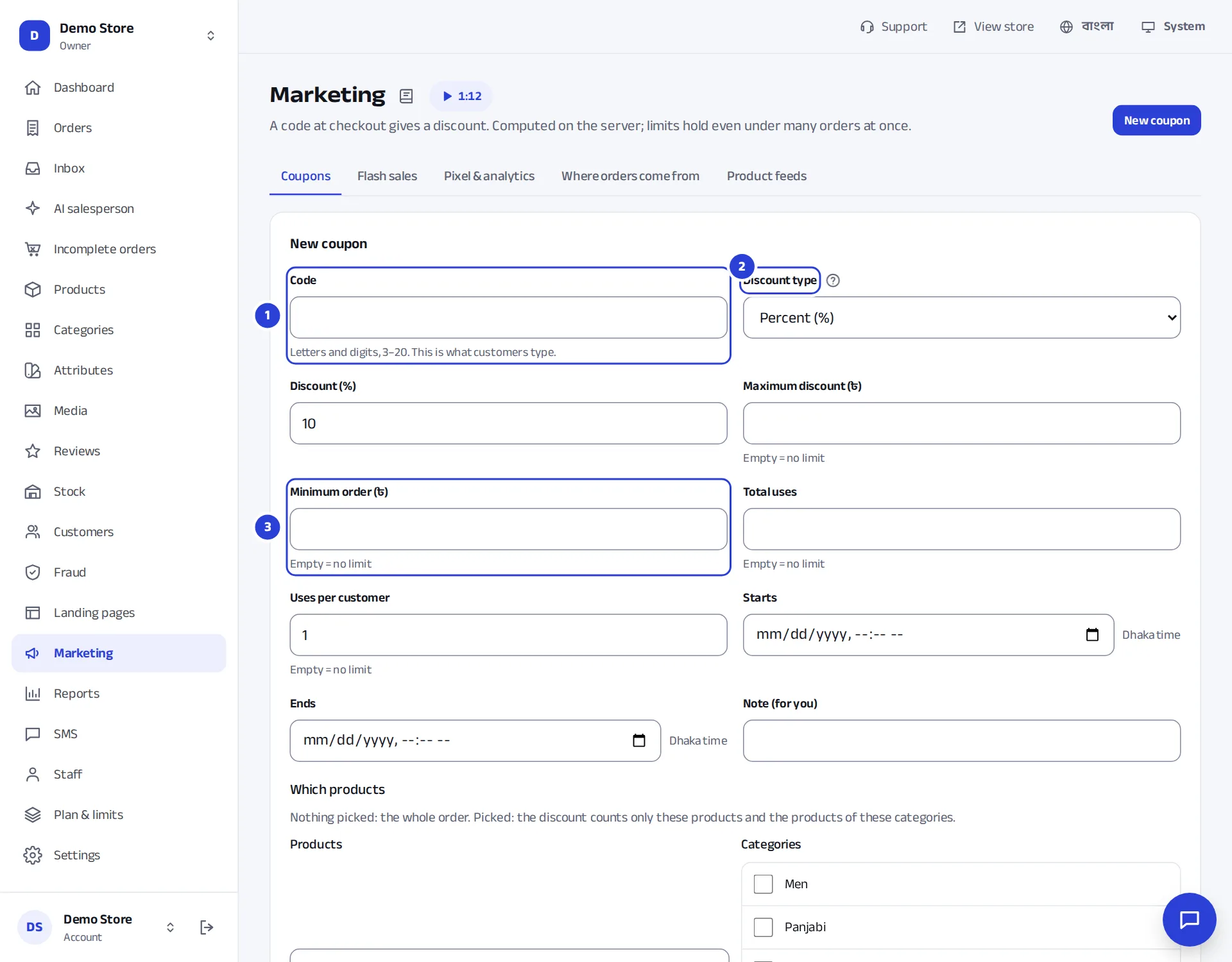
- Type the Code 1: English letters and digits, 3–20, starting with a letter or digit (
-and_work after that). It turns uppercase by itself, and shoppers can type it in any case. Two coupons can’t share a code: “This coupon code already exists.” - Pick the Discount type 2, then the amount under Discount (see below).
- Set the rules you need 3; see rules below.
- Leave Enabled ticked and press Save.
Discount types
- Percent (%): that percentage off the items total (at most 100), in whole taka, rounded up in the shopper’s favour: 10% of ৳677 is ৳67.70, so ৳68 comes off. The discount line shows both, “−৳67.70 ≈ 68”; the total, the COD and the SMS use the whole taka. Add a Maximum discount (৳) if you like, as in “10% off, up to 200 taka”; 0 or empty means no cap.
- Fixed amount (৳): that many taka off. Never more than the items total.
- Free delivery: the whole delivery charge comes off; item prices stay.
Discounts are worked out on the items total (without delivery); only free delivery works on the delivery charge.
Rules
Every rule is optional; empty means no limit:
| Field | Meaning |
|---|---|
| Minimum order (৳) | the coupon doesn’t work below this items total |
| Maximum discount (৳) | percent only: the discount never goes above this |
| Total uses | how many times it can be used across all customers |
| Uses per customer | how many times one mobile number can use it (1 at the start) |
| Starts / Ends | when it runs, in Bangladesh time (Dhaka time beside the box) whatever your device’s clock says; the end must be after the start |
| Which products | pick products, or categories (their products count): the discount is worked out on those products only, and a basket without any of them can’t use the coupon (“This coupon does not apply to these products”). Nothing picked: the whole order. The minimum order is still measured on the whole basket |
| First order only (a mobile number that never ordered before) | only a number with no earlier order at your store (cancelled orders don’t count) |
| Note (for you) | only you see it in the list (under the code), never the shopper; up to 300 characters |
“Per customer” counts by the order’s mobile number. When an order is cancelled its use comes back, so the shopper can use the coupon again.
The list and statuses
Each coupon in the list shows its Code, Discount, Rules, Used (like “12 / 100”), Orders / sales (orders that weren’t cancelled, their sales: product price after discounts, no delivery charge; and the discount given underneath) and Status:
- On: usable now.
- Off: Enabled is unticked.
- Scheduled: Starts hasn’t come yet.
- Expired: Ends has passed.
- Used up: Total uses is reached.
Use the row menu to Edit or Delete. To keep old orders’ history tidy, untick Enabled instead of deleting.
Share a coupon in a link
Add ?coupon=CODE to any store link and the coupon fills in at checkout by itself, like https://your-store.{root}/?coupon=EID20. Use it in Facebook posts, ads or Messenger. If the link already has a ?, add &coupon=EID20.
Where coupons work: the store checkout, orders you take by hand, and orders the AI salesperson takes in Messenger or Instagram when the customer gives a code. A recovery SMS can carry a code for the shopper to type at checkout. Landing page order forms have no coupon field.
See also: Flash sales · Where orders come from