Returned parcels and stock
As soon as the courier says a parcel is coming back, the order becomes Returned by itself. Choose whether the goods go back in stock automatically when it arrives, or after you check them.

On this page
When a parcel can’t be delivered, the courier brings it back to you. As soon as the courier says it is coming back, the order becomes Returned by itself. What’s left is putting the goods back in stock once the parcel is with you.
How a return arrives
- When the customer refuses the parcel, or you ask for it back, the courier sends it back. On the way, the card says Coming back, and the order is already Returned. Its stock doesn’t move yet: the parcel isn’t with you.
- When it reaches you, the courier tells us: the parcel becomes Returned too. With Back in stock automatically, the goods go back in stock now.
- At Steadfast, “cancelled” in their panel means the parcel is coming back once a rider has picked it up; we show it as Coming back. A parcel Steadfast cancels before it ever left you (an area it doesn’t serve, or your cancel request approved) is Cancelled instead, and the order goes back as for any cancel before pickup.
- A partly delivered parcel (or one delivered as an exchange) stays delivered when the courier sends back the pieces the customer didn’t keep (or the old item): the order doesn’t become Returned, and its money stays counted. The card says those pieces are on their way back, then that they are back; once you have them, put back in stock what came back. Pathao says which kind of return it is; for Carrybee and Paperfly any return after a partial delivery or an exchange is read this way.
- Sometimes the courier delivers it after all. If nothing was put back in stock yet, the order goes back to Delivered by itself (the customer doesn’t get the delivered SMS twice). If the goods are already back in stock, or you returned the order yourself, it stays Returned and the timeline says the courier reports it delivered: check with the courier.
To ask for a parcel back yourself, press Cancel / request return on the order page. What each courier does: Cancel or ask for a return.
Stock on return
On the For every courier card in Settings › Couriers (Checkout & charges tab), choose Stock on return 1, then press Save:
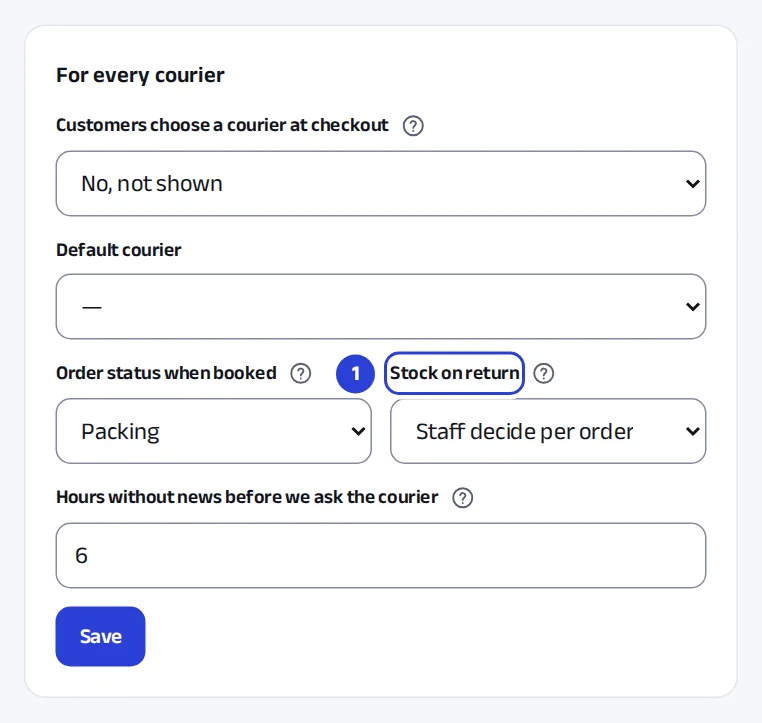
- Staff decide per order (intact / damaged) (the default): a returned parcel doesn’t change the stock. You open it, check, and decide.
- Back in stock automatically: all the order’s items go back in stock when the courier says the parcel reached you, not while it is coming back. A partly delivered parcel, or the old item of an exchange, never goes back by itself: you choose what came back (below).
Putting goods back after checking
With “Staff decide per order” chosen:
- Open the returned order.
- The Courier card says “The parcel came back. If the goods are fine, put them back in stock.” While the parcel is still on its way, it says “The parcel is on its way back, so the order is Returned. Once it reaches you and the goods are fine, put them back in stock.”
- Under What came back? each item of the order is listed. For a whole parcel every item is ticked to start with; for a partly delivered one, none. Untick what didn’t come back, or lower Back on the shelf to the number of good pieces.
- For the pieces left out, choose why in the box beside them: damaged (to start with), lost, or kept by the customer.
- Press Put back in stock. You’ll see “3 items back in stock.”
Only what you chose goes back in stock; the pieces left out are noted on the order’s timeline with their reason (“Not put back: …”). It works once per order.
Watch out
Stock is already back when “Back in stock automatically” is chosen and the parcel has reached you. When you move a shipped order to Returned yourself, the same What came back? list shows there, and what you tick goes back at once. Each piece comes back only once: pressing Put back in stock afterwards adds nothing for pieces already back.
When you mark several orders Returned at once from the list, nothing goes back in stock by itself under “Staff decide per order”: open each order and put back what came back.
Partly delivered parcels
When the customer keeps some items and the rider brings the rest back, the order stays Partly delivered (it doesn’t become a return).
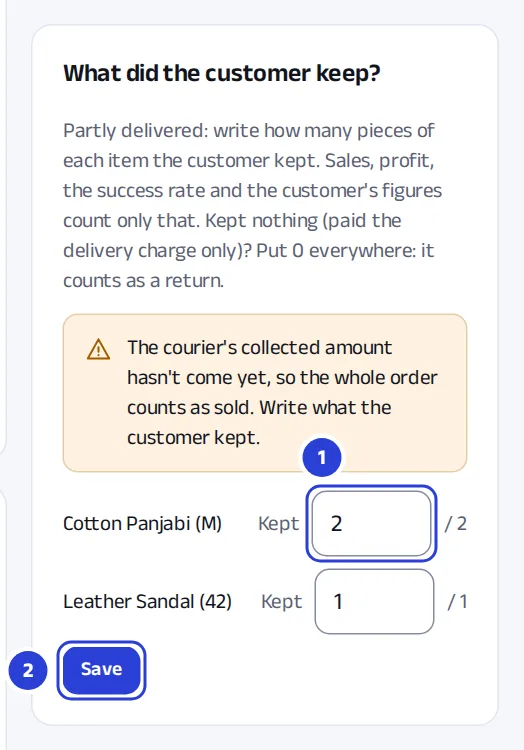
- The order page shows What did the customer keep?. Until you answer, sales are estimated from what the courier collected less the delivery charge (or, before the courier says, the whole order counts).
- Write how many pieces of each item the customer kept 1 and press Save 2. Sales, profit, the delivery success rate and the customer’s figures (delivered, total spent) then count only what was kept. If the customer kept nothing and paid only the delivery charge, put 0 everywhere: it counts as a return for the goods and the success rate.
- When the rest reaches you (the timeline says when the courier reports the return leg), press Put the pieces back in stock under the same card. Damaged or lost pieces don’t go back; their cost counts in Return losses.
The same card on a Delivered order (Record returned pieces) is for a customer who sends some pieces back after delivery: the order stays delivered and its sales go down.
A parcel the courier lost
If the courier loses a parcel, press Parcel lost on the order’s courier card. The parcel closes, the order becomes Returned without counting as the customer’s return, and the goods’ cost counts in Return losses. If the courier pays you for it, enter the amount: it counts as income against that loss.
Undo a mistake
Marked an order Returned or Cancelled by mistake? For 7 days the order page shows A mistake?: write why and press Undo. The order goes back to where it was (a return to Delivered or Shipped, a cancel to its open stage), and everything follows: pieces put back in stock leave it again, a cancelled order holds its stock again (if it’s still there) and takes its coupon use again, and the customer’s figures go back. The customer gets no SMS.
When you cancel an order for your own reason (out of stock, a duplicate, your mistake), tick “Cancelled for the store’s reason”: it then doesn’t count as the customer’s cancel in their record and risk check.
Exchanges
When a customer wants another size after delivery, use the courier’s exchange: the new piece goes out and the old one comes back. It works on a delivered parcel at a courier that offers exchanges (Paperfly, Carrybee).
- On the Courier card of the delivered order, press Send an exchange.
- Tick the piece you’re replacing, then choose what you’re sending (another size of the same product is picked to start with) and how many. The form lists what the customer has now: after an earlier exchange, that’s the piece it delivered (M swapped for L, then L for XL: the L comes back).
- Check the COD (usually 0), weight and description, and send.
What happens to the stock:
- What you send joins the order as a ৳0 line, shown under the line it replaces. Its stock is held at once.
- When the courier picks the parcel up, it comes off the stock.
- If the exchange is cancelled before pickup, the hold is let go and the line goes. If the courier refuses the exchange, nothing is held.
- Once the exchange is delivered and the old piece is back, use Put returned pieces back in stock on the card to choose what came back, with a reason for any piece that didn’t (damaged, lost, kept by the customer). Once per exchange; the button shows only after the parcel is delivered or back.
- If the exchange parcel itself comes back undelivered, put the piece you sent back the same way.
- If the whole order comes back later, what goes back in stock is what the customer has now: after an M → L exchange, the L.
The order stays Delivered the whole time, and its money doesn’t change.