Parcel tracking
What each parcel status means, how the order follows it by itself, which of your own statuses courier news puts it in, and how customers follow their parcel on the tracking page and in the shipped SMS.

On this page
After booking, parcel news comes instantly through the courier’s webhook, or we ask the courier ourselves after some hours (webhook). Each update changes the Courier card on the order page and, where it should, moves the order.
Parcel statuses
| Status | Meaning | The order |
|---|---|---|
| Booked | the courier accepted the booking but hasn’t collected it | as set in Order status when booked |
| Picked up | the rider collected the parcel | Shipped |
| In transit | moving between hubs | Shipped |
| Out for delivery | on its way to the customer today | Shipped |
| On hold | stuck for some reason; the Hold reason shows | no change |
| Delivered | the customer took it | Delivered |
| Partly delivered | the customer took some items | Partly delivered |
| Coming back | the parcel is on its way back to you | Returned at once; the stock waits for the parcel (stock rule) |
| Returned | the parcel is back with you | Returned (stock rule) |
| Cancelled | the booking was cancelled before pickup | a Shipped order goes back to Confirmed |
| Problem | courier news we don’t recognise | no change |
How the order follows
- Statuses only move forward. Old or late news never moves a parcel back.
- A New or On hold order is confirmed first, then shipped, when the pickup is reported.
- Sometimes you’ll see “(Rider’s word; courier confirmation pending)”: the rider marked it delivered but the courier hasn’t confirmed yet. The order waits for the confirmation, then moves on by itself.
- Every update is kept in the Parcel history and shows in the order’s timeline.
- If the courier delivers a parcel after saying it was coming back, the order goes back to Delivered by itself, as long as nothing was put back in stock yet. Otherwise it stays Returned and the timeline asks you to check with the courier (Returned parcels and stock).
- To know right now, press Refresh status.
- Whenever a courier’s webhook arrives, we refresh that parcel by ourselves a minute and a half later: many couriers keep some steps only in their own status and tracking (Steadfast’s warehouse lines, for one) and never send them as webhooks. Several webhooks for the same parcel in a row ask once.
- A partly delivered parcel stays Partly delivered while the items the customer didn’t take come back to you, at every courier; it never turns into a return. The timeline asks you to put them back in stock (Partly delivered parcels).
Steadfast: its own tracking and your return request
For a parcel you booked with Steadfast from the order page, the Courier card also shows what Steadfast itself says:
- Steadfast tracking: Steadfast’s own history of the parcel (created, sent to a warehouse, given to a rider…), oldest first, with the time of each line. A rider’s phone number in it shows in full; tap it to call from your phone. It is read again each time you press Refresh status, and also by itself when we ask Steadfast about a quiet parcel and find news its webhook never brought. A line that says the parcel moved on (picked up, at a hub, with a rider) moves the parcel here too.
- Return request: after you cancel or ask for a parcel back from this card, the card shows where Steadfast has your request: Sent, Pending, Approved and so on. Press Refresh status to read it again. Reading it changes nothing at Steadfast.
A parcel you entered by hand (booked in Steadfast’s panel) has neither.
When the courier pays you
Once a courier pays you a parcel’s money, the Courier card shows one green line:
- Steadfast: “Steadfast paid
(SFC-…)”: when the payout holding the parcel in Steadfast’s own payments list was marked paid, and its number (to match your bank statement, Reports → Steadfast payouts). Steadfast’s “payment request” news changes nothing by itself: the payments list is read 10 minutes later, and the line comes only once the money went to the bank (“paid”). The parcel also gets what the courier collected (when it was not known) and its COD charge (the payout’s COD charge split over its parcels, when none was recorded). - Pathao, Carrybee, Paperfly: “
invoiced/paid ”: when the courier sent the parcel’s “paid” or invoice news. An invoice counts as paid.
From then on the parcel’s money is in the home’s Cash received; until then it is under “With the couriers”.
Order status on courier news
The “The order” column in the table above is today’s rule. If you use statuses of your own, you can choose the name an order takes on each piece of courier news, like “With the delivery rider” on Out for delivery.
- Open Settings › Couriers, the Status mapping tab. It has the Order status on courier news card.
- For the news you want a name on, choose one in its field, e.g. Out for delivery 1 or On hold 2.
- Press Save 3.
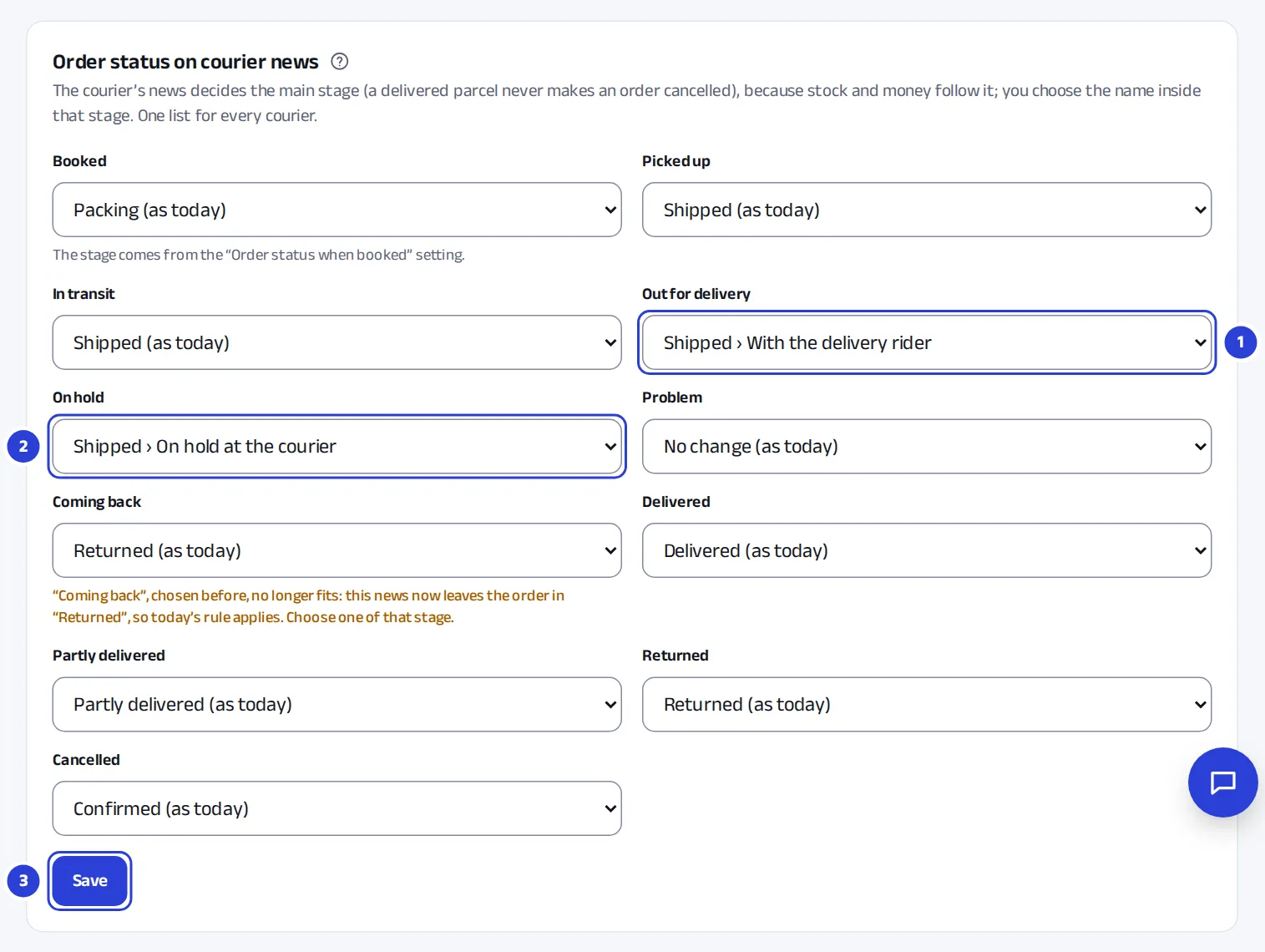
The courier’s news decides the main stage, because stock and money follow it: a delivered parcel never makes an order cancelled. You only choose the name inside that stage, so each field offers only that stage’s statuses, written like “Shipped › On hold at the courier”.
| News | The order’s stage | What the field offers |
|---|---|---|
| Booked | what Order status when booked says: Packing or Shipped | that stage’s statuses |
| Picked up, In transit, Out for delivery | Shipped | Shipped’s statuses, separately for each |
| On hold, Problem | no change | Shipped’s statuses; set only while the order is shipped |
| Coming back | Returned | Returned’s statuses, like “Coming back”; when none is chosen, what you chose for Returned |
| Delivered | Delivered | Delivered’s statuses |
| Partly delivered | Partly delivered | Partly delivered’s statuses |
| Returned | Returned | Returned’s statuses; set when the parcel reaches you. With none chosen, a “coming back” name goes and the order is just Returned |
| Cancelled | a Shipped order goes back to Confirmed (cancelled before pickup) | Confirmed’s statuses |
- Every field starts at “… (as today)” or No change (as today), today’s rule. If you change nothing, nothing changes.
- One list for every courier.
- With no statuses of your own yet, the card says every piece of news works as it does today, with a Make statuses (Settings → Orders) link.
- A status you set by hand changes when the next news moves the order to another stage, or when that news has a status chosen. News that leaves the order in the same stage, with today’s rule chosen, keeps the name you set.
- If a chosen status is archived or deleted later, or Order status when booked changes, it no longer applies: that news follows today’s rule again, and the field says why. Choose another if you like.
- Since 13 October 2026 Coming back makes the order Returned at once, so a Shipped status chosen for it before no longer applies: choose one of Returned’s.
- The list doesn’t apply to the rider’s word (courier confirmation pending) or to exchange parcels.
- When news sets a status whose SMS is on, that SMS goes too (An SMS for this status).
The customer’s tracking page
Your store has a /track page (for example https://your-store.{root}/track). Customers enter the order number and the mobile number they ordered with. The number works with or without its prefix, with or without # (Order numbers).
- By default they also get a 6-digit SMS code, so nobody can look up an order just by knowing a phone number. Each code uses SMS credits.
- You can switch to order number + mobile only. When the store can’t send SMS (no gateway, no credits), tracking falls back to that by itself; it never switches off. Where to change it: Order tracking in SMS settings.
- The page shows the order status, items, total and amount due, the parcel status (in plain words for customers), the courier’s id and a link to track on the courier’s site.
- Download links for digital products show only after the code sent to the phone, even with “order number + mobile only”. When the store can’t send SMS, an order with an email says the links were emailed (the address shown like
r***@gmail.com); one without an email asks the buyer to contact you (Digital products). - The Download your files button in the download email opens this page with the order and its files straight away, no form, for 7 days. After that the page says the link has expired and shows the usual form.
- The status name: if the order is in a status of your own with Customers see it on, that name; otherwise the main stage’s name (your name for it, if you renamed the stage).
The shipped SMS
When an order becomes Shipped, the customer gets an SMS (on for new stores): which courier has it, how much to pay on delivery, and a short link to the tracking page. An order shipped without a courier gets the same text without a courier’s name. To change the text or turn it off: SMS and email.
More: Booking a parcel from an order · Returned parcels and stock