Order numbers
Number orders your way, like RF-01025: a prefix, the next number and a minimum number of digits. Old orders keep their number; search, SMS, invoices, tracking and couriers all use the same one.

On this page
Out of the box, order numbers are plain numbers: #1001, #1002 … You can put letters of your own in front, like RF-01025, so the number alone tells people it’s your store: on the phone, in an SMS and on a parcel’s label. This is on every plan; changing it needs the settings permission.
Set up your numbers
- Open Settings › Orders. The card at the top is Order number.
- Type what goes before the number in Prefix 1, e.g.
RF-. - Change the Next number 2 if you need to.
- Pick the Minimum digits 3.
- Check the Next order number 4 below, then press Save.
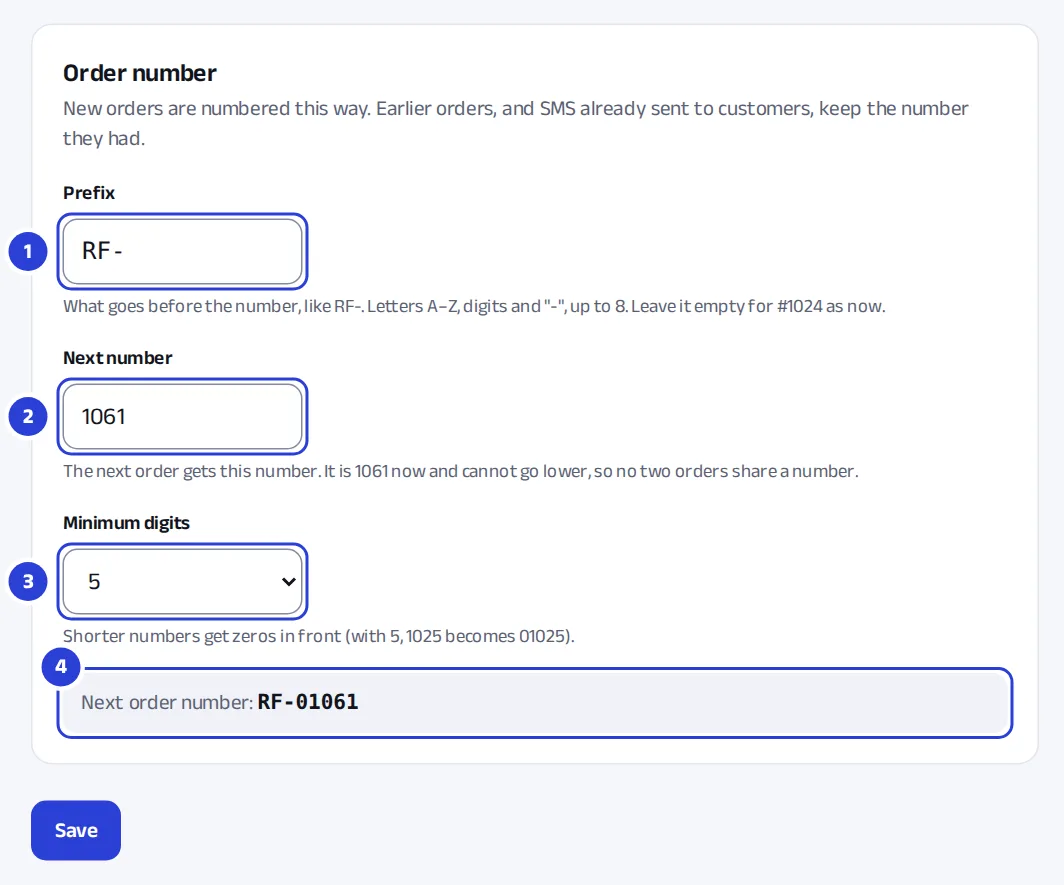
The next order that comes in gets the new number. Further down the same page: your own order statuses.
Prefix
- 0 to 8 characters: the letters A–Z, the digits 0–9 and “-”. Lower-case letters become capitals by themselves, and spaces are dropped.
- Left empty, numbers stay as before:
#1024. With a prefix there’s no#in front:RF-01025. - It can’t end in a digit. Here’s why: prefix
A1with number025readsA1025, and so does prefixAwith number1025; two orders could read the same, and a search could bring up the wrong one. If you want a digit at the end, follow it with a hyphen, likeRF1-.
Next number
- The number the next order gets. The line under the field says what it is now.
- It only moves forward, never back, so no two orders ever share a number. For example, to start at 5000 in the new year, enter 5000.
- A prefix doesn’t restart the count at 1: there is one running number. If the last order was #1012, the first one after setting
RF-isRF-01013(with 5 digits). - Orders that come in while the page is open move the number on by themselves; if you don’t touch the field, saving never moves it back.
Minimum digits
- 1 to 8. Shorter numbers get zeros in front: with 5, 1025 becomes
01025. Longer numbers simply get longer; nothing is cut. - It works without a prefix too: with 5 digits the number reads
#01025.
The sample
Next order number shows the number the next order would get with what’s in the fields now. If the prefix breaks a rule, the reason shows under the field, the sample leaves the prefix out, and it won’t save until it’s fixed.
Old orders keep their number
Each order writes its number down when it is made. When you change the prefix or the digits later, only new orders follow the new rule; earlier orders, their invoices and the SMS already sent to customers keep the number they had. So the list can show the new RF-01013 right above the old #1012.
Where the number shows
The same number everywhere, as it was written when the order was made:
- Dashboard: the order list, the order page, the timeline, the duplicate and fraud messages, orders made from incomplete orders.
- For customers: your store’s thank-you page, landing page confirmations, the tracking page, the customer’s account,
{order_number}in SMS, and order emails. - On paper: invoices and packing slips, barcodes included (Printing).
- In files: the
numbercolumn of the orders you export to Excel. - Outside: the courier reference (below), and wherever the order number goes to the Facebook Pixel and the Conversions API.
A number with a prefix is always written in English digits, because that is what customers read out and type back.
Search by number
Type the number any way you like into the search box of the Orders list: RF-01025, rf-1025, RF01025, 1025, #1025 or with Bangla digits ১০২৫.
- Digits alone find the order with that number, whatever its prefix.
- With a prefix, the prefix has to match; capitals and hyphens don’t matter.
- Customers can do the same on your store’s tracking page: with or without the prefix, with or without
#.
Courier references
Each parcel you book carries a reference of ours to the courier (Steadfast’s invoice, the others’ merchant order id). It helps when you look the parcel up in the courier’s panel.
- For an order with a prefix, the reference is the order number itself:
RF-01025. - For a plain number, it is your store’s address name and the number, as before, e.g.
RAHIM-FASHION-1024. So stores sharing one courier account never mix up numbers. - Booking the same order again with the same courier adds
-R1,-R2(Booking again). - A reference longer than the courier allows (49 characters at Carrybee, for example) loses characters from the front; the number stays.
More: Your own order statuses, Search and filters, Printing.