Partner programme
Earn a commission by telling online sellers about CZ Commerce. Applying, the partner page, your link and code, the commission rules and statuses, the payout method, asking for a payout (minimum and hold) and its statuses.

On this page
The partner programme is for people who know many online sellers: Facebook group admins, YouTubers, consultants. A share of the cash payments of the merchants who come through your link or code is your commission. It is not the merchants’ referral programme: the commission is money, sent to bKash, Nagad or a bank, while referral rewards are promo credit.
Applying
- Fill in the form on the Become a partner page at the foot of {root}: your name, mobile number and how you will promote it.
- Once our team approves it, you get an SMS (and an email, if you gave one).
- Sign in to the panel with the same mobile number you applied with; with no account yet, open one with it. Partner appears in the menu of your account’s pages.
Already have an account? Our team can also add it to the programme directly; Partner then appears in your menu.
Before approval, or on an account with another mobile number, the page says You are not a partner yet.
Good to know
One account can be a merchant and a partner. Your own store earns no commission through your own link or code.
The partner page
Partner in the menu of your account’s pages (beside My stores, Wallet and Support) opens it:
- At the top: Link clicks, Signups, Merchants who paid and Active merchants.
- Your link and code 1, with the commission rule in one line.
- Earnings 2: Pending, Payable and Paid, and Ask for a payout.
- Marketing kit: the home and pricing pages with your link, share images in Bangla and English, and the Partner terms.
- Payout method 3, then the Commissions and Payouts lists.
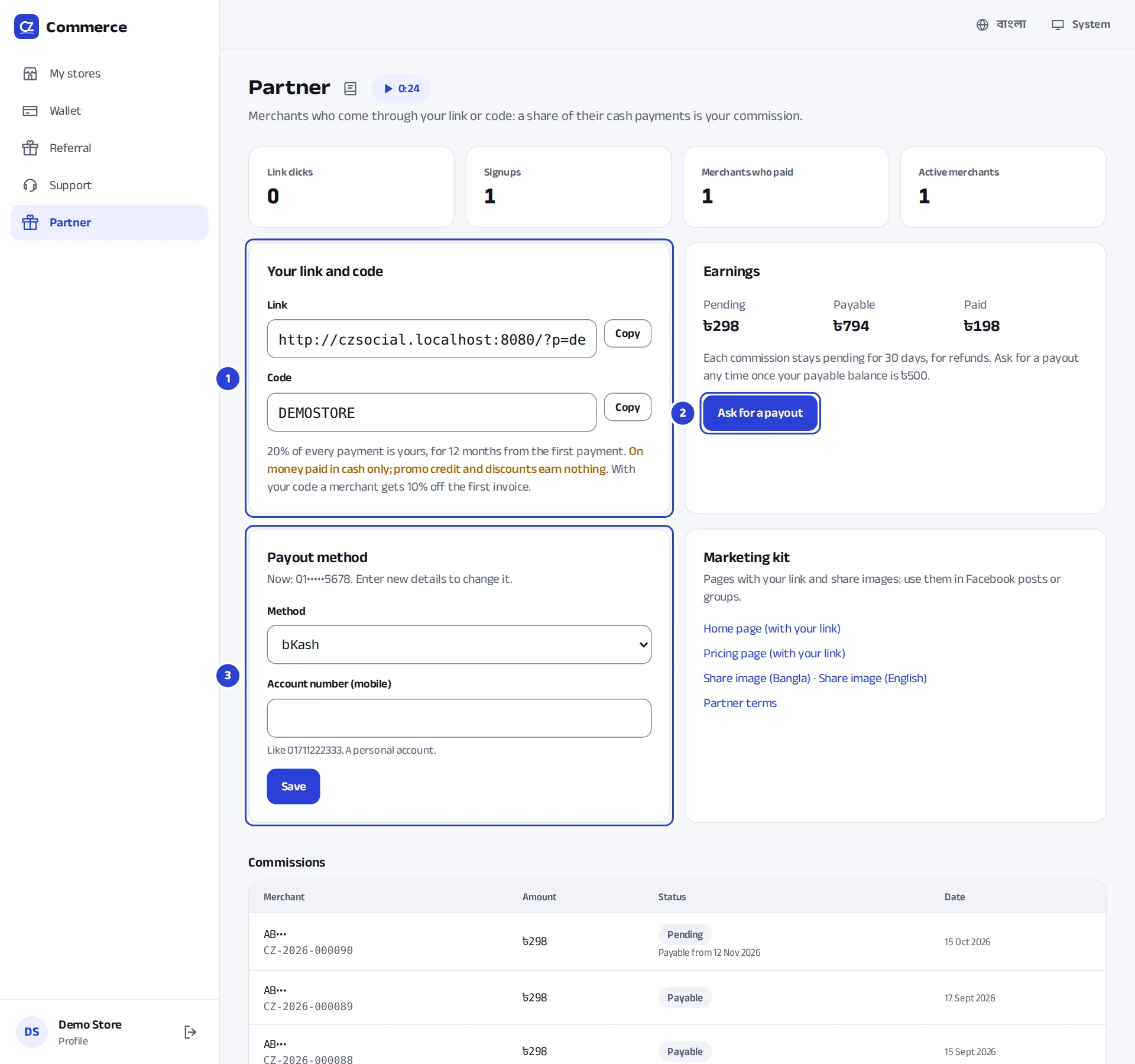
Your link and code
Press Copy beside the Link or the Code.
- The link: the website remembers the last partner link someone came through (for 90 days), and when they open an account they become your merchant for good.
- The code: a new merchant can enter it while signing up or when buying a plan (coupons and promo codes). Your code also gives them a discount; the page says which, for example “With your code a merchant gets 10% off the first invoice.” A merchant who enters your code becomes yours, unless another partner brought them first. Typed while signing up, your code wins over another partner’s link they came through: the code is what they chose. Your code gives no discount on your own account, nor while your partnership is paused.
Commission
The page shows your rule, for example “20% of every payment is yours, for 12 months from the first payment.”
- A share of every payment of your merchant (plans, add-ons, SMS credits), for the months shown from their first payment.
- On money paid in cash only: promo credit and discounts earn nothing. Wallet money no payment stands behind earns nothing either: an upgrade’s leftover credit (the payment it came from earned already), a referral reward or a credit from support. Money the merchant topped up and then spent from the wallet does earn.
- Each commission waits for refunds first: “Each commission stays pending for 30 days, for refunds.” A refund to the merchant takes its share off the commission (Refund adjustment in the list). A commission whose payment is being refunded waits until the refund is done. A refund that comes while your payout is under way comes off that payout.
Each line in Commissions shows the merchant, the amount, its status and the date:
| Status | Meaning |
|---|---|
| Pending | Waiting out the refund days; “Payable from …” shows when |
| Payable | Ready to be paid out |
| Paid | Paid out to you |
| Reversed | Refunded in full, so nothing is owed |
| Under review | Our team is checking it, for example when your payout number is also the mobile of a merchant you brought. They then release it or cancel it |
Payouts
- Under Payout method, choose bKash, Nagad or Bank and give the account (for bKash or Nagad a personal number such as
01711222333; for a bank the bank, branch, account name and number) and press Save. After that only part of it shows, such as “01•••••5678”. - Once your payable balance reaches the minimum (“Ask for a payout any time once your payable balance is ৳500.”), press Ask for a payout. The request is for all of your payable balance, and one request runs at a time (“A payout of ৳… is under way.”).
- Our team approves it and sends the money. You get an SMS when it is sent, and the transaction id shows in the Payouts list.
Payout statuses: Requested, Approved, Rejected (the commissions become payable again) and Sent.
Watch out
The payout method can’t change while a payout request is under way.
When the partner account is suspended
The page then says so: no new merchants are added, pending commissions are frozen and no payout can be asked for. Write to support to know more (support tickets).
See also: referral programme.