Invoices and refunds
Invoices, receipts and credit notes, where to find them, their statuses and types, print or PDF, paying an open invoice, what to do when one expires, and how refunds work.

On this page
Every sale and every taka that moves gets its own paper (an invoice, a receipt or a credit note), with its own number:
| What | What for | Number |
|---|---|---|
| Invoice | A purchase: a plan, a renewal, an upgrade, an add-on, SMS credits | CZ-2026-000123 |
| Receipt | Money into your wallet: a top-up, or a CZ Pay payment that arrived after its invoice could no longer take it | CZ-R-2026-000045 |
| Credit note | Each refund, tied to the invoice or receipt it refunds | CZ-CN-2026-000007 |
You’ll find them in two places:
- All of them on the account owner’s Wallet & invoices page (Wallet in the account menu): every store’s invoices, the receipts and the credit notes.
- One store’s invoices and their credit notes under Invoices at the bottom of that store’s Plan & limits page, for the owner and anyone with the store’s billing permission (the store’s billing). Receipts belong to the account, so they are only on the owner’s page.
The list
Under Invoices & receipts, each one shows its Number (with its kind under it), the Store, the Type, the Amount (and how much was refunded), its Status 1 and Date, newest first. The buttons above the list show All or only Invoices, Receipts or Credit notes; Show more at the bottom brings older ones. A store’s own list (on Plan & limits) is called Invoices and has no Store column and no Receipts button: All, Invoices or Credit notes.
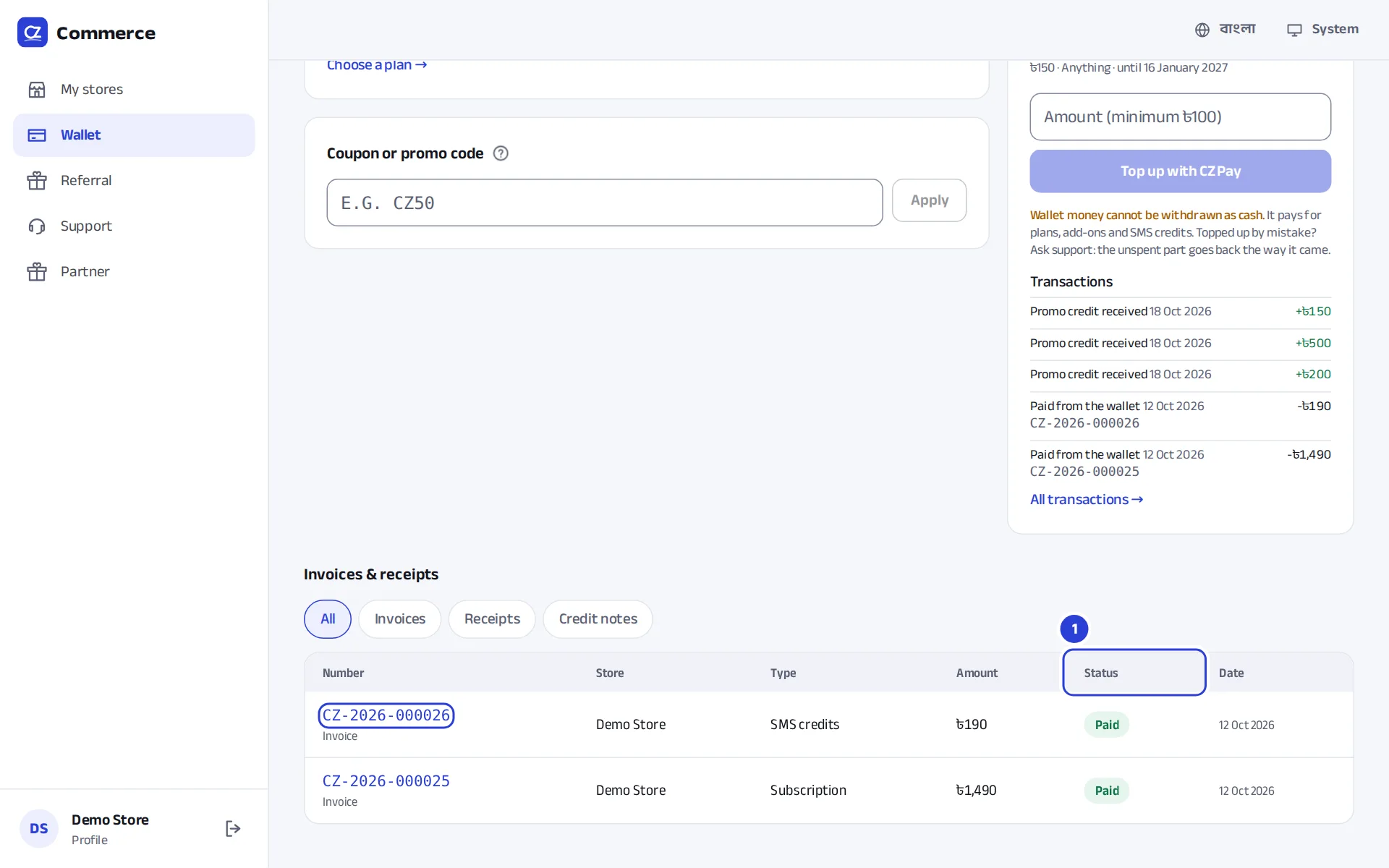
The status in the list is always the same word as the stamp on the paper itself:
| Status | Meaning |
|---|---|
| Due | Not paid yet; open it to pay |
| Paid | Paid, and what you bought is on |
| Partly refunded | Paid; part of it has been refunded |
| Refunded | Paid, then refunded in full |
| Expired | Not paid within the set days (usually 7), so it closed |
| Void | Cancelled, for example when a payment link couldn’t be created or the plan was changed |
A refund only changes the status once it has completed. While one is still on its way, the status stays as it was and Refund in progress shows beside it.
A credit note’s status: Refund pending (on its way), Refunded (done) or Cancelled (called off; no money moved).
Types: Subscription (a new plan), Renewal, Upgrade, Downgrade, Add-on, SMS credits, Wallet top-up and Late payment. A credit note shows the type of what it refunds, with “Refund of CZ-…” under it.
An invoice’s or receipt’s page
Tap a number to open it, exactly as it prints. Above it, its status (the same badge as in the list) and what it is tied to: an invoice’s credit notes, a credit note’s invoice or receipt, a late payment’s invoice; each opens with a tap.
- At the top, the CZ Commerce logo, the name, address, phone, email and website of who issues it (and the trade licence or BIN when set), the title (Invoice, Receipt or Credit note), its number and the status stamp.
- Bill to: the account owner’s name, email and mobile. Store: the store it is for, with its web address (a receipt has none). Invoice details: the type, the Issue date, the Due date while open or the Paid on date once paid, and for a plan or a monthly add-on its Period (from and to).
- Each line: Description, Qty, Unit price and Amount, such as “Growth · 3 months” or a setup fee.
- Subtotal, a coupon’s line (“Coupon CZ50 · 50%”, coupons) or a referral discount, on an upgrade the “Credit for unused days” the bill used, VAT (only when there is any, with its rate), the Total, what was Paid and the Balance due. An upgrade whose credit was more than the bill shows the rest as Credited to the wallet.
- Payment: each source it was paid from: From promo credit, From the wallet, Through CZ Pay (with the TrxID of the payment that paid it) or Paid directly to the platform (with its reference), and when. Refunds show under Refunds, each with its credit note.
- An open invoice says How to pay and carries a QR code: scanning it opens this invoice in the panel.
At the foot: “Computer-generated invoice; no signature required.” and our support phone and email.
Print or save as PDF
- On its page, press Print / save as PDF at the top. The paper alone opens in a new tab, A4 sized, without the panel’s menu or bottom bar.
- Press Print / save as PDF there too. The browser’s print window opens.
- Pick a printer for paper. For a PDF file, choose “Save as PDF” as the printer. Keep the paper A4 and the margins at their default.
Tip
Invoices, receipts and credit notes always print on white, even when the panel is in the dark theme. It is in the panel’s language: in Bangla, amounts and dates in Bangla digits, phone numbers in English ones. A long one that runs over several pages repeats the table’s head on each page and numbers the pages at the bottom; the PDF is named after its number.
Pay an open invoice
- Press Pay beside Open invoices (in the store’s billing section or on Wallet & invoices), or open the invoice from the list.
- Press Pay now. The payment summary opens.
- Keep Use wallet ticked (it starts ticked) to spend wallet money first; the summary shows what the wallet pays and what is left for CZ Pay.
- Press Pay now in the summary. If the wallet covers it, it’s paid on the spot. If not, pay the rest through CZ Pay (bKash/card).
Back from CZ Pay, the progress screen checks the payment (while it pays); keep it open. If the payment didn’t go through, the invoice stays open and Try again pays it again. “Not confirmed yet” means that if money was taken, the invoice updates by itself within a few minutes.
A renewal that wasn’t paid from the wallet comes with a payment link by email and SMS, and the store’s billing section shows Pay now (bKash/card) (renewal).
Good to know
An Expired invoice can’t be paid any more. Start the purchase again: choose a plan or buy the add-on. Wallet money set aside for the invoice goes back to your balance. If you paid through CZ Pay after it closed, the money isn’t lost: it goes into your wallet with a receipt, and the screen says “The money is in your wallet”.
Refunds
To ask for a refund:
- Open Support from the account menu (account owners).
- Press New ticket.
- Write why you want a refund and include the invoice or receipt number (support tickets).
Money goes back the way it came. When a refund is approved, the platform team enters only the amount; it is split over the ways the invoice or receipt was paid, in proportion:
- the part paid through CZ Pay goes back through CZ Pay to the bKash or card you paid with (this can take a few days to reach you);
- the part paid from your wallet goes back to your wallet (“Refund into the wallet” in the transactions);
- the part paid with promo credit comes back to the same promo grants, with their own dates (one whose date has passed meanwhile lapses at once), never as money (promo credit);
- a part paid directly to the platform is sent back directly, with a reference.
Each refund is a credit note with its own number. It shows every part, where it went and whether it is done. You get an email with the credit note’s number and where each part went. When the last part is done, the invoice turns Partly refunded or Refunded, everywhere at once: the list, its page, the PDF and the emails.
A refund of a top-up receipt can only return what is still unspent in the wallet. That money is set aside in the wallet while the refund runs (“Reserved”), then leaves the wallet back to the bKash or card you paid with (“Top-up refunded to you” in the transactions).
The refund policy in short (the full, current policy is on our refund policy page):
- Within 7 days of your first payment for a paid plan, provided the plan wasn’t used substantially, you get a full refund. Once per account.
- Within 48 hours of an automatic renewal, if the plan wasn’t used in the new period, the renewal is refunded.
- Cancelling mid-period or moving to a smaller plan is not refunded; the plan runs until the period ends.
- Bought SMS credits aren’t refunded as money. Credits for SMS that weren’t sent come back automatically.
- Wallet money can’t be withdrawn as cash; an unspent top-up made by mistake can go back the way it came. Promo credit and referral rewards are never refunded.
- If you were charged twice by mistake, you get it all back.
See also: Billing and wallet, Choosing and changing plans.