Choosing and changing plans
Choose a plan for each store, pick a period and see the savings, start a free trial, upgrade (unused days are credited), move to a smaller plan at the period end, or renew early.

On this page
New stores start on the free plan; you don’t pick a plan when you open a store. When you need more products, orders or features, choose a plan on the store’s Plan & limits page. The owner can, and so can anyone the owner gave the billing permission (the store’s billing). Each store has its own plan. For what each plan costs, see our pricing page.
The inbox and AI in every plan
Every plan, the Free plan too, has the inbox (Messenger, Instagram, comments and your website chat) and the AI salesperson. What changes from plan to plan is how many Facebook Pages and how many of your shop’s own WhatsApp numbers (coming soon) you can connect, and how many free AI credits you get each month (one text answer is 1 credit; what a credit pays for):
| Plan | Facebook Pages | WhatsApp numbers | Free AI credits a month |
|---|---|---|---|
| Free | 1 | 1 | 50 |
| Starter | 1 | 1 | 300 |
| Growth | 3 | 2 | 1,000 |
| Pro | 10 | 5 | 2,500 |
These are the plans’ figures at launch; our pricing page always has the current ones. The free credits start over on the 1st of each month. Until a Page is connected, your home shows a Connect your Facebook Page card with this month’s free credits left (connect a Page).
The panel’s AI assistant is in every plan too, with its own free messages each month: Free 30, Starter 150, Growth 250, Pro 300 (what it costs).
Choose a plan
- In the store, open Plan & limits from the left menu.
- Press Choose a plan (on a free store) or Change or renew at the top. The plans open in the billing section below, under Choose a plan.
- Each plan’s card shows its name, a short description, the price and its first 8 features; See all features shows the rest.
- On the plan you want, pick how many months in the Period 1 list.
- Press Choose 2.
- The wallet pays first and CZ Pay (bKash/card) takes the rest (how payments are split).
First the payment summary shows what the wallet pays and what is left for CZ Pay; press Pay now. Once paid, the screen says “Done” and the plan is on, with the date it runs until.
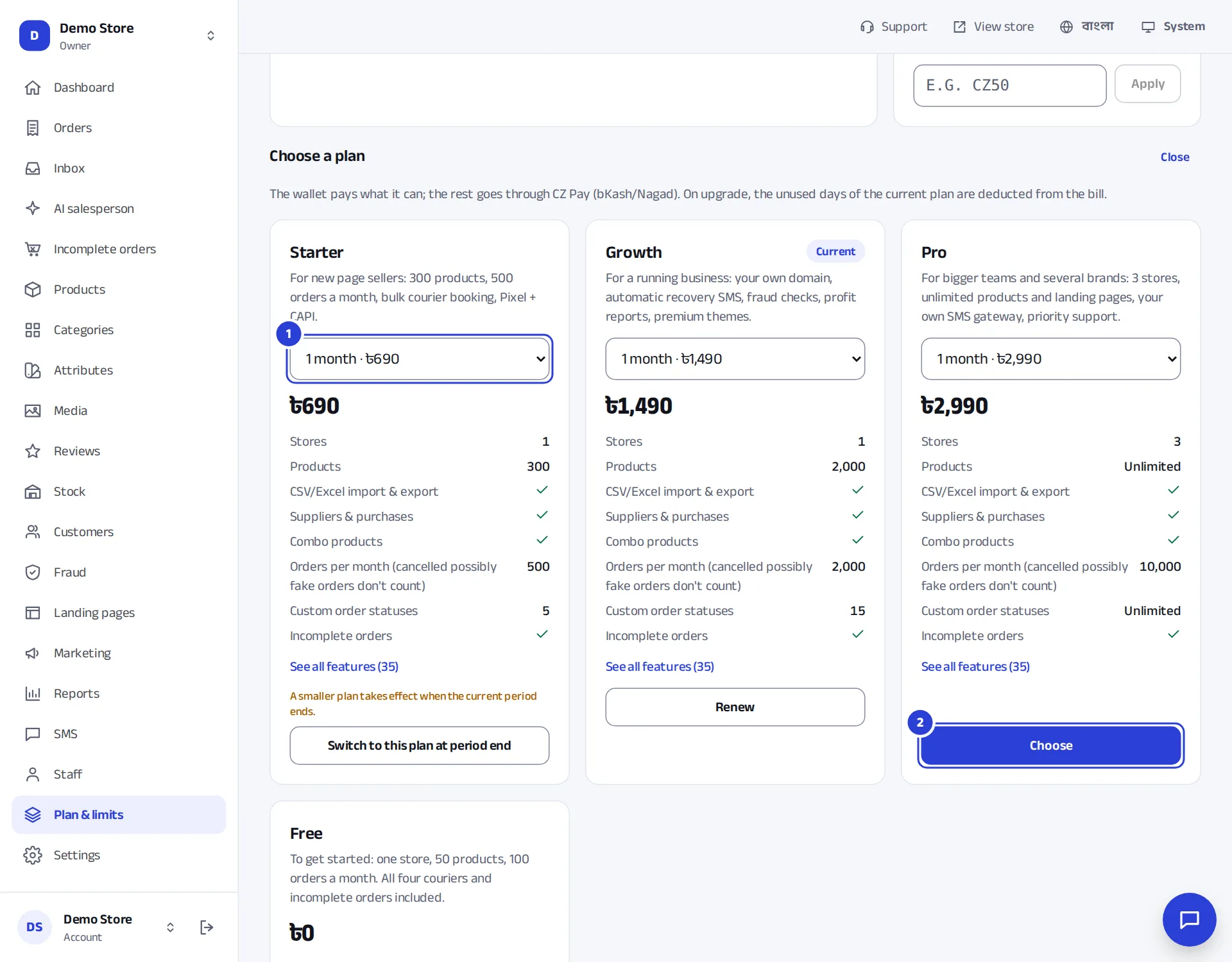
The free plan’s card has no button. To go back to the free plan, press Cancel at period end in the store’s billing section.
With a coupon
When your account has a coupon, it shows above the plans, for example “CZ50 · 50% off · 4 months left”. The cards keep the plan’s full price; the discount comes off in the payment summary and on the invoice. No coupon yet? While buying a plan, press Have a code? in the payment summary and enter one (the owner only). The rules: coupons.
Periods and savings
- Each plan comes in a few periods, for example 1, 3, 6 and 12 months.
- Longer periods cost less than paying month by month; the card shows “save …%” beside the price.
- A setup fee, if any, is shown under the price. VAT, if any, is mentioned at the top of the page.
- Your price doesn’t change during the current period; a new price applies from the next renewal.
- Renewals use the same plan and the same period (renewal).
Free trial
While the store is on the free plan, plans with a trial show “…-day free trial · Start trial” on their card.
- Press it. No payment; the plan is on straight away. If the trial would change which stores take orders, it asks first: when the trial’s store takes one of your account’s places, the stores that would stop taking new orders a day later are named; when this store is paused, the trial opens it again and that counts as this month’s one reopening. Press Start the trial anyway to go on, or Cancel.
- During the trial, the store’s billing section shows the date it runs until.
- When it ends the store goes back to the free plan by itself and nothing is charged. To keep the plan, press Choose during the trial: the paid period starts when the trial ends, so the trial days left are not lost.
- The owner gets a reminder email 3 days and 1 day before the end. If the trial is what lets your extra stores take orders, the email also names the stores that will stop taking orders after it ends (more stores than your plans allow).
Each plan’s trial can be used once per account, not once per store. Trying again says: “The trial for this plan was already used.”
If you have entered a coupon, a trial of a plan it covers keeps the coupon’s place for you until 2 days after the trial ends; a trial costs nothing, so the discount starts with the first payment (coupons).
Move to a bigger plan (upgrade)
Pressing Choose on a bigger plan while a paid plan is running upgrades you straight away:
- The new plan’s full period starts today.
- The unused days of the current plan are taken off the bill; the invoice shows a line “Unused days of the current plan”.
Move to a smaller plan
A smaller (cheaper per month) plan doesn’t start mid-period; it starts when the current period ends, so the money you paid isn’t wasted.
- Among the plans (Choose a plan), pick a period on the smaller plan.
- Press Switch to this plan at period end.
The store’s billing section says “Changes plan at the period end”, and the Current plan card says “Next period: …”. Changed your mind? Press Undo cancel in the billing section. At the period end the new plan is charged the same way a renewal is. Products, landing pages and staff beyond the smaller plan’s limits then become inactive until there is room, and you choose which stay active (when your plan gets smaller). Facebook Pages beyond its limit (the last connected) stay connected but inactive until you disconnect another or upgrade.
Renew early
Your current plan’s card says Current and has a Renew button. Pick a period and press Renew: the new period is added after the current one ends, so no days are lost.
Good to know
If you only need one limit raised, an add-on can do it without changing the whole plan.
See also: Plan & limits, Billing and wallet, Referral.