Opening a store
A name and an address are all a new store needs; it starts on the Free plan. The address rules, suggestions when one is taken, and what is set up for you the moment the store opens.

On this page
Opening a store takes less than a minute. Give it a name and an address; everything else can be set up later.
Before you start
- Your email must be verified (verify your email).
- Anyone signed in can open a store. If so far you only work in other people’s stores as staff, this first store of your own gives you your own account; you accept the Terms on the form (a staff member’s first store).
- You need room under your store limit (the store limit).
Fill in the form
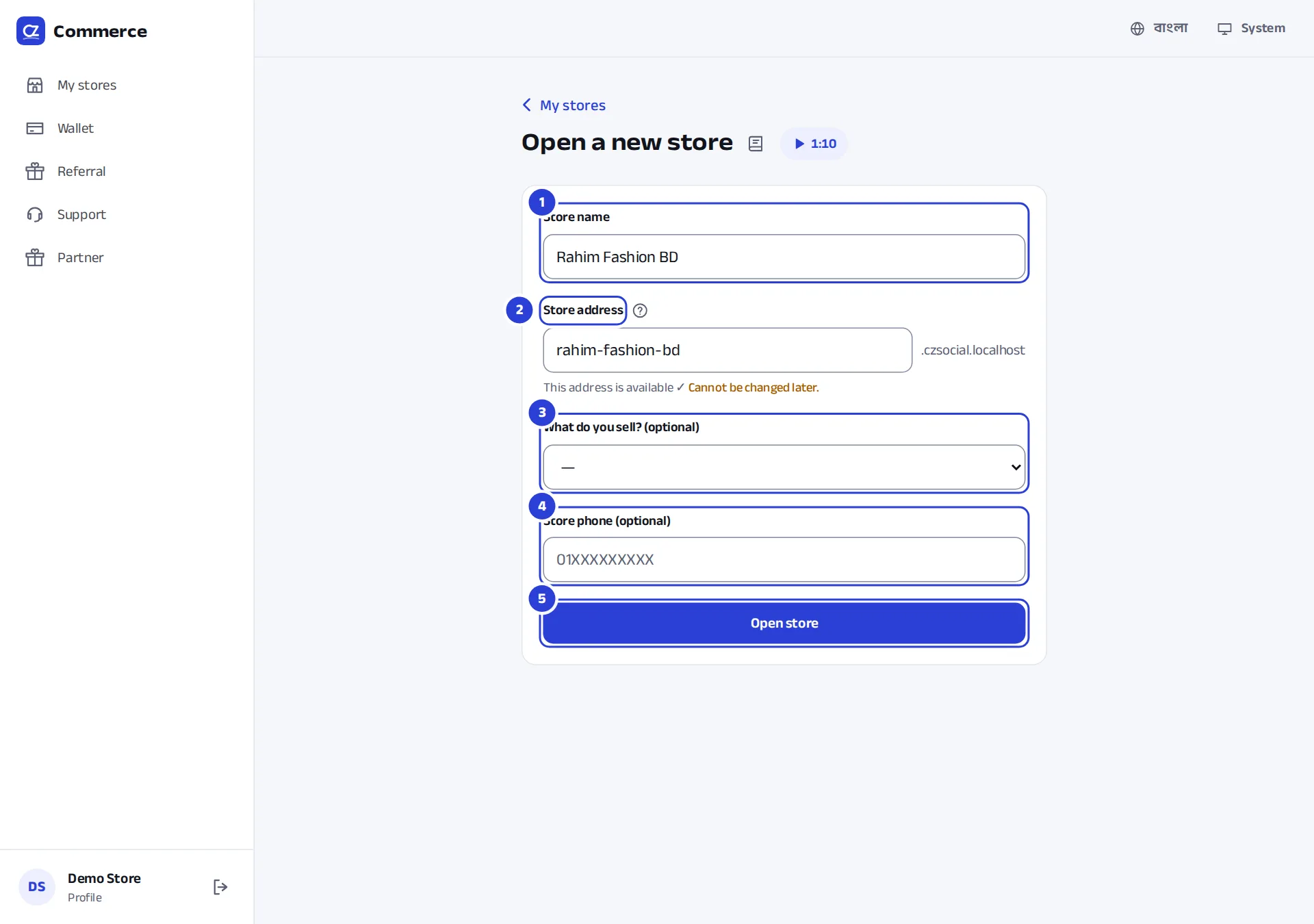
- Press New store in the store switcher at the top left, or on My stores. The Open a new store form appears.
- Type the Store name 1, for example “Rahim Fashion BD”. Customers see this name on the store and in every SMS, so it may not hold a web address, a phone number (more than 4 digits) or another company’s name such as bKash, Nagad or Rocket.
- The Store address 2 is suggested from the name as you type (
rahim-fashion-bd). Change it if you like; the rules are below. - Pick your kind of shop in What do you sell? (optional) 3: clothing, beauty, gadgets, food, health, home and lifestyle, or other.
- Optionally enter the store’s mobile number in Store phone (optional) 4.
- For your first store of your own, tick that you agree to the Terms of Service and the Privacy Policy (the box shows only then).
- Press Open store 5. It stays off until there is a name and an available address (and the tick, when it is asked for).
“Congratulations! … is ready.” appears and the new store’s dashboard opens by itself. If that takes a while, press Store dashboard.
The store address
The store address is the first part of your store’s web address: rahim-fashion-bd opens the store at rahim-fashion-bd.{root}. The rules:
- 3 to 30 characters.
- Lowercase English letters (a-z), numbers (0-9) and hyphens (-) only.
- No hyphen at the start, at the end, or two in a row.
- A few words we use ourselves, such as
www,api,admin,dashboardanddocs, can’t be taken. Nor can well-known brands, banks, payment services, couriers, mobile operators or government names, even written with hyphens (you-tubeisyoutube); some names scammers use are refused anywhere in the address (bkash-offer, for example). You then see This word cannot be used.
As you type, we check whether the address is free. If it is, you see This address is available ✓. If someone has it, These may be available: lists a few close alternatives (ending in -bd or -shop, for example); tap one to use it.
Watch out
The store address can’t be changed later, so choose with care. It is not part of order numbers; orders start at #1001. You can add your own domain (like
rahimfashion.com) later (your own domain).
What is set up for you
- Free plan: every new store starts on the Free plan; you don’t pick a plan when opening it.
- The address works: the store address is live right away.
- You are the owner: your role in the store is Owner.
- Dashboard: at
dashboard.{root}, under the store’s own path (dashboard.{root}/s/rahim-fashion-bd/), and in your store switcher. The store address followed by/adminleads there too (the word that opens the dashboard). - Stock location: one, called “প্রধান স্টক” (main stock).
- Delivery zones: three ready-made zones, yours to change (delivery charges and zones).
| Zone | Charge | Each extra kg |
|---|---|---|
| Dhaka city (ঢাকা শহর) | ৳60 | ৳15 |
| Around Dhaka (ঢাকার আশেপাশে) | ৳100 | ৳20 |
| Outside Dhaka (ঢাকার বাইরে) | ৳120 | ৳20 |
From the Free plan to a bigger one
The Free plan has lower limits on things like products, staff and landing pages. The dashboard’s Plan & limits page shows yours. When you need more, upgrade (the store’s plan, plans and prices).
Next: the dashboard tour, then add your first product. Running more than one store: several stores and the switcher.