Setting up the Steadfast webhook
Put our webhook address and token in your Steadfast panel and every pickup, delivery and return reaches your orders the moment it happens.

On this page
A webhook is Steadfast telling your store the news: a parcel was picked up, delivered or returned, and the order’s status changes by itself straight away. You set it up once and never think about it again.
Good to know
Connect Steadfast first (Connecting a courier). The webhook address and token only appear once it is connected.
Copy the address and the token
- Open Settings › Couriers.
- On the Couriers tab, press Open beside Steadfast. On its card, find Webhook: automatic order status.
- Tap Copy next to Webhook address (Callback URL) 1.
- Tap Copy next to Token / Secret 2.
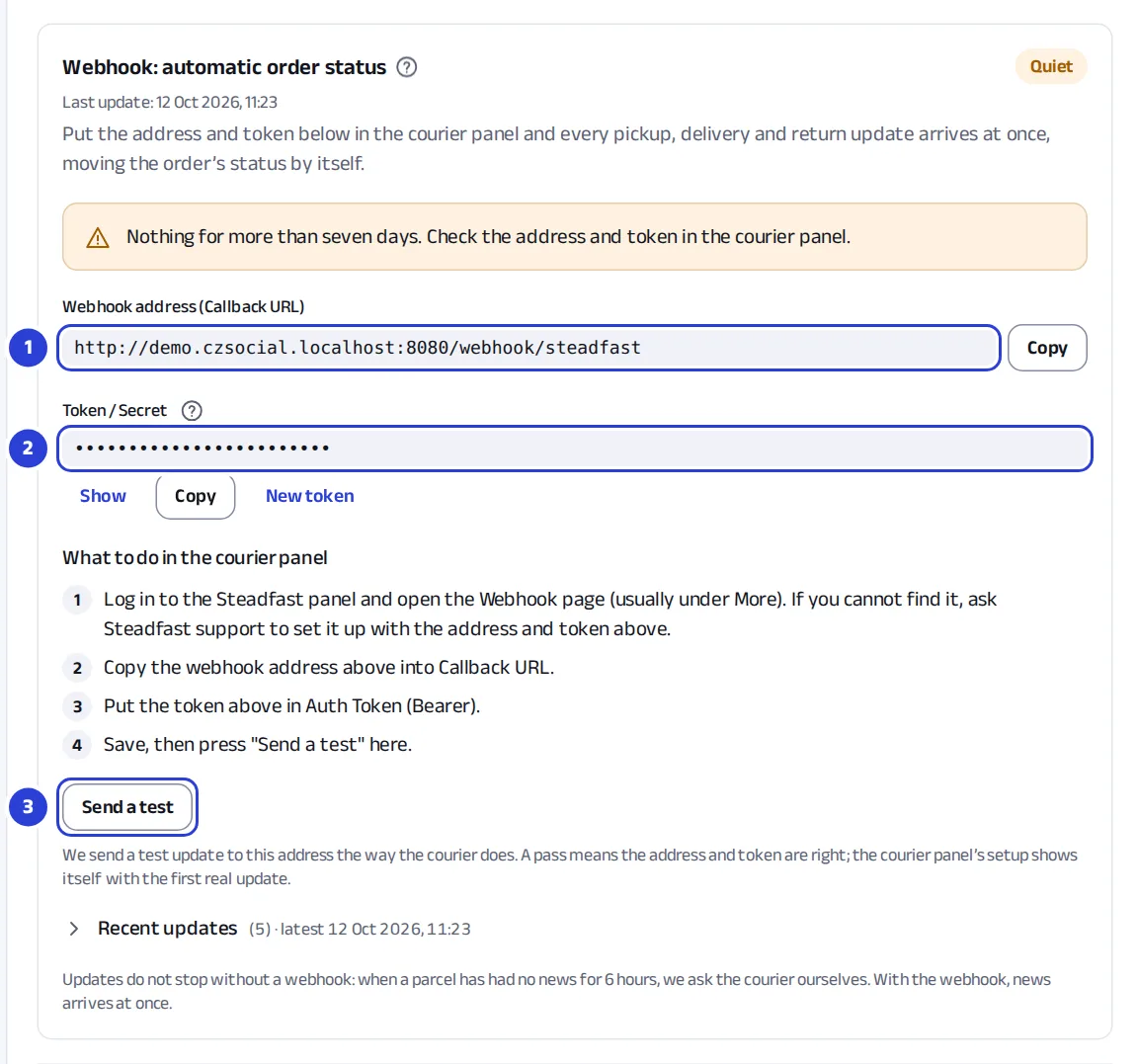
The address looks like https://your-store.{root}/webhook/steadfast. Use this address even if your store has its own domain.
Paste them in the Steadfast panel
- Log in to the Steadfast merchant panel and open the Webhook page (usually under More).
- Paste the address in Callback URL.
- Paste the token in Auth Token (Bearer).
- Press Save.
Tip
Can’t find the Webhook page? Send the address and token to Steadfast support and ask them to set it up.
Check that it works
Back in your dashboard, press Send a test 3. We send a test update to the address exactly the way Steadfast does.
- “The address works and the token matches” means you are done.
- With the first real parcel update the card says Working, and every update is listed under Recent updates (press it to open the list).
- Token mismatch means the token in the Steadfast panel is wrong: copy it in again.
If you make a new token
New token stops the old token at once. Paste the new one in the Steadfast panel too, or updates stop arriving.
Watch out
Updates don’t stop completely without a webhook: when a parcel has had no news for the hours you set (6 to start with), we ask Steadfast ourselves. With the webhook, news arrives instantly, so it is worth setting up.
Updates not arriving? See When the webhook doesn’t work.