Your own SMS gateway
Send your store's SMS through your own REVE account or any Bangladeshi SMS company's API. No credits from us, and your own masking name.
On this page
If you already have an account with an SMS company, your store’s SMS can go through it. Then our SMS credits aren’t used, you pay your own provider, and customers see your own Sender ID or masking name.
Good to know
Your own gateway is on Pro. On other plans the card says “Your plan does not include an own gateway. Upgrade to use one.” (Plans). It says the same if the platform has switched own gateways off for a while.
Save the gateway
- Open SMS in the left menu and stay on Setup & credits.
- On the Own SMS gateway card on the right, pick the Type 1: REVE or Another company (HTTP API).
- Fill in the fields (each type is below).
- Press Save gateway 2.
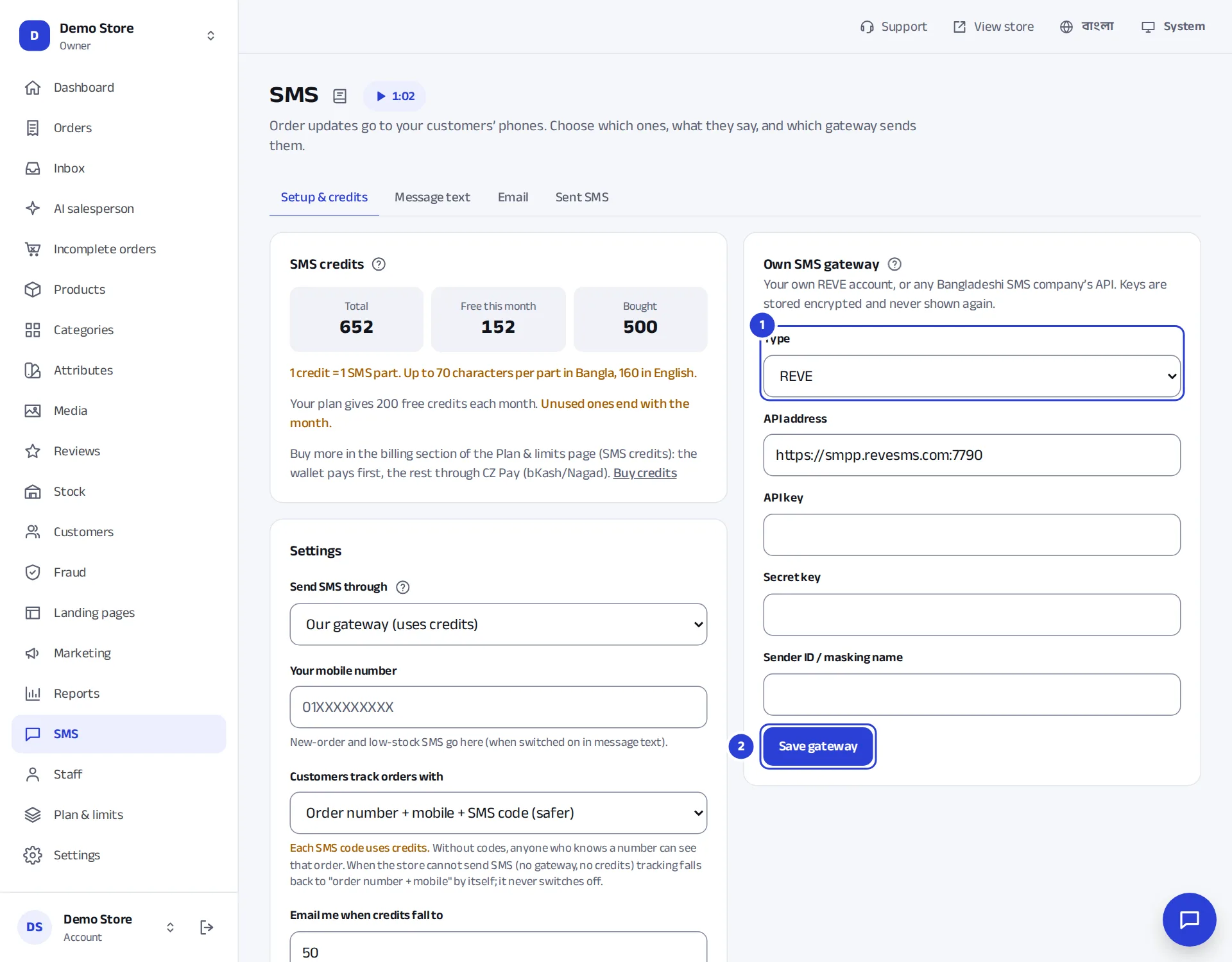
Keys are stored encrypted and never shown again. After saving, the card only says which gateway it is (like “Saved gateway: REVE · YourName · smpp.revesms.com:7790”). Use Replace to change it and Remove to delete it. Without it, SMS go through our gateway again and use credits.
REVE
Take these from your REVE panel:
| Field | What to put |
|---|---|
| API address | https://smpp.revesms.com:7790 is filled in; use another address if REVE gave you one |
| API key | your REVE API key |
| Secret key | your REVE secret key |
| Sender ID / masking name | the Sender ID or masking name REVE approved for you |
Another company (HTTP API)
For a company that sends SMS when you call a URL, fill these in from their API documentation:
-
Method:
POSTorGET. -
URL: their send address, which must start with
https://. -
Body type (POST only):
JSON,Form (x-www-form-urlencoded)orQuery. With GET, every field goes in the URL. -
Fields: one per line,
name=value. Put{to}(the number),{message}(the text),{sender}and{api_key}in the values. Up to 20. It starts with:to={to} message={message} api_key={api_key} sender={sender}Use the names the company wants, like
msisdn={to}orsms={message}. -
API key and Sender: these fill in
{api_key}and{sender}. -
Number format: how the company wants numbers:
8801XXXXXXXXX,01XXXXXXXXXor+8801XXXXXXXXX.
How we tell it worked
We read the company’s answer to know whether the SMS went. Under Success when the answer has pick:
- a JSON value: for a JSON answer, put the field in JSON path (e.g. status) and the success value in equal to. For
{"status":"success"}the path isstatusand the valuesuccess. Use dots for inner fields, likedata.status. - a word in the text: for a plain-text answer, put the success word in contains, like
SENTor1701.
JSON path of the message ID (optional): if the answer carries a message ID, give its path and we keep it in the log.
Test it
- After saving, put your own mobile in Test number on the same card.
- Press Send a test SMS. It goes through your gateway right away and uses no credits.
- “Sent. Check the phone.” means check your phone.
- “The gateway did not send it: …” shows the reason; fix the fields, usually the keys or the success rule.
You can send up to 5 tests in 10 minutes.
Switch it on
Saving the gateway doesn’t send through it yet. On the Settings card on the left, set Send SMS through to My own gateway (no credits) and press Save (which gateway). Until a gateway is saved, or when your plan doesn’t include it, that option is greyed out.
If a later plan change takes the own gateway away, or you remove the gateway, SMS go back to our gateway by themselves, under our sender ID and using credits.
Once it’s on:
- Every SMS of the store goes through your gateway, with no credits: order SMS, tracking and checkout codes, recovery SMS, SMS sent from the order page and the inbox, and the new-order and low-stock SMS to you.
- You can write your own texts under Message text, even in a trial; the free and trial rules for the platform’s number (our texts only, 30 new numbers a day for manual orders) don’t apply (Free plan and trials).
- Sent SMS lists them as before, but they stay at Sent (we can’t learn Delivered from your gateway). Each shows your own sender ID in “Sender ID: …”; if it shows ours, the SMS went through our gateway (Which gateway sent it).
- The per-number hourly and per-store daily limits still apply.
- If your gateway fails, the SMS is Failed; it does not fall back to our gateway by itself.
SMS not going out: When SMS are not sent.